There are an abundance of SEO tools for small businesses. But, with limited resources and budget, small businesses can face an added challenge: finding the right tech stack that does everything they need to maintain a competitive edge in search, without breaking the bank.
![SEO Starter Pack [Free Kit]](https://no-cache.hubspot.com/cta/default/53/1d7211ac-7b1b-4405-b940-54b8acedb26e.png)
Solving this challenge is non-negotiable. According to HubSpot’s State of Marketing report, 50% of small businesses consider their website, blog, and SEO their most leveraged marketing channel. When organic search is the single biggest driver of growth, finding the right tools to do it well is essential.
This guide helps business owners and SEO teams decide which tools fit their goals and build a tech stack that drives measurable results. It includes recommendations for free tools to get started with today, and for when you’re ready to invest, a categorized breakdown of must-have SEO software for small business.
Table of Contents
How to Choose SEO Tools for Your Small Business That Fit Your Goals
Free SEO Tools for Small Businesses to Start Fast
When Free Stops Being Enough
Best SEO Tools for Small Businesses By Category and When to Buy
How to Measure Answer Engine Visibility and Adjust Your SEO Tools
Frequently Asked Questions About SEO Tools for Small Business
How to Choose SEO Tools for Your Small Business That Fit Your Goals
Every business needs SEO tools for digital marketing that also fit their goals, budget, and team skill level. There’s no one-size-fits-all for choosing the best SEO software for small business. Instead, small business decision-makers should outline criteria that tools need to meet. With a framework of what tools need to do, tool selection becomes easier. Here are some criteria to help the decision-making process.
Growth Goals
The online marketing tools a business needs depends entirely on what the business is trying to achieve right now. A business launching its first website has different priorities than one trying to scale content production. Here are some growth goals and the types of tools that may be suitable:
|
Goal
|
Tool
|
|
Launch a new website
|
Start with an auditing tool to benchmark the current site and identify growth opportunities.
|
|
Drive more conversions from organic traffic
|
Prioritize keyword research and content optimization tools.
|
|
Fix visibility or ranking drops
|
Start with a technical SEO audit tool.
|
|
Compete locally
|
Focus on local SEO and Google Business Profile tools.
|
|
Prove ROI to stakeholders to increase budgets
|
Lead with analytics and reporting tools.
|
Tool Category Match
There’s a lot to SEO. Each pillar of SEO (on-page, technical, and backlinking) has its own specialist set of tools.
Teams should match tools to categories to see which tool helps where and — perhaps more importantly for small business — which tools overlap across multiple functions. One tool that can do it all is potentially cheaper than buying many. The major tool categories (as covered in this article) are:
Keyword research. Finding topics and search opportunities worth targeting.
Technical SEO. Identifying crawl errors, speed issues, and indexing problems.
Content optimization. Improving on-page relevance and content coverage.
Backlink research. Understanding your link profile and finding outreach opportunities.
Rank tracking. Monitoring keyword position changes over time.
Local SEO. Managing listings, reviews, and local search visibility.
Analytics and reporting. Tying traffic and content performance to leads and revenue.
Tip: Don’t rush out and buy a tool for every category on day one. Choose the categories that map most directly to your growth goal, then expand from there. It’s important that search engine optimization software drives growth and that the SEO team actually uses it.
Ease of Use and Integration Check
Tool subscriptions can run up a bill and you might find that team members aren’t logging in and using it. Consider how easily the team can integrate the new tool into the day-to-day, and whether or not there’s any desire to actually use it. Look for tools with:
An excellent user experience (UX). If a tool is easy to use, it’s more likely the team will adopt it.
Integrations with your current tech stack. If a new tool integrates with existing systems, it’s easier for the team to adopt the new tool into their workflows.
Training and support. Strong support teams ensure that SEO teams can use the tool without a steep learning curve.
Think About Budget
Budget is sometimes enough to rule a tool in or out. If the company can’t afford it, then procurement teams must find another solution. The table below details some tasks and recommends whether tools help complete the task for free, or if a paid solution might be best.
|
Situation
|
Recommendation
|
|
You're just getting started and learning the basics
|
Start free
|
|
You need data beyond a tool's limitations, and the SEO team is actively using the tool and finds it conducive to SEO success.
|
Go paid
|
|
Your team lacks SEO expertise and needs guided recommendations
|
Go paid
|
|
You need to report results to a client or leadership
|
Start free
|
|
You only need one specific function (e.g. Google Search Console for rank tracking)
|
Stay free
|
|
You're managing SEO across multiple pages, products, or locations
|
Go paid
|
|
You need your SEO data to connect to CRM or lead data
|
Go paid or see how far you can go with HubSpot’s tools
|
Tip: Before investing in a new tool, check for overlap with your existing stack. There’s no point paying for another tool if one already your team uses solves the same problem.
Run through this checklist:
Does a tool I already pay for offer this feature?
Is this tool solving a problem tied to my current growth goal?
Will my team actually use this, or does it require skills we don’t have?
Have my team asked for a tool that solves these problems?
Does the tool integrate with my existing CMS, CRM, or analytics setup?
Can I measure its impact within 90 days?
Free SEO Tools for Small Businesses to Start Fast
Free SEO tools help small businesses start with lower cost and lower complexity, but they don’t always have the capabilities for scale.
In the section below, find a detailed breakdown of every tool suitable for small businesses. Many of them offer free editions, or they’re always free. Read on to find more information and access comprehensive recommendations for every tool, including paid tools.
|
Tool
|
Best For
|
Pricing
|
When to Upgrade / Buy
|
|
Keyword Research Tools
|
|
Keywords Everywhere
|
Freelancers, solopreneurs, and small teams wanting lightweight keyword insights directly in Google SERPs
|
Starts at $7/month
|
Worth buying immediately if SEO teams will actively use keyword insights during daily browsing.
|
|
Google Keyword Planner
|
Small businesses that want a free keyword research starting point.
|
Free with a Google Ads account
|
Upgrade to paid SEO tools when the team could benefit from a better UX, competitor insights, advanced keyword segmentation, or filters like intent and keyword type.
|
|
Semrush
|
Businesses ready for comprehensive SEO, competitor analysis, and technical SEO workflows
|
Free version, paid plans start at $139/month
|
Upgrade when teams need multiple SEO tools in one platform, competitor analysis, keyword tracking, or technical audits.
|
|
Technical SEO Tools
|
|
HubSpot Website Grader
|
Businesses running their first technical audit or needing simple health reports
|
Free forever
|
No upgrade required; use this entry-level auditing tool before moving to deeper crawlers.
|
|
Screaming Frog
|
Growing websites needing detailed technical audits
|
Free version, paid version is $279/year
|
Upgrade if crawling sites over 500 URLs, scheduling crawls, or integrating with tools like Google Analytics or Google Search Console.
|
|
HubSpot SEO Recommendations
|
Teams using or considering HubSpot Marketing Hub
|
Through Marketing Hub, free version available, Starter from $20/month
|
Upgrade when replacing multiple marketing tools or CRM systems, or needing guided technical SEO workflows.
|
|
SE Ranking
|
Lean teams wanting affordable all-in-one SEO tooling.
|
Plans start at $103.20/month
|
Upgrade when managing multiple domains, scaling SEO operations, or needing white-label reporting.
|
|
Content Optimization Tools
|
|
HubSpot Content Hub
|
Businesses wanting content creation, SEO optimization, and analytics on one platform
|
Free version, paid plans start from $20/month
|
Upgrade when publishing content regularly and needing lead/revenue attribution and AI content tools.
|
|
HubSpot SEO Performance Analysis
|
HubSpot users wanting SEO insights tied to CRM and revenue
|
Included within Marketing Hub
|
Upgrade the broader HubSpot package when merging SEO, CRM, reporting, and content workflows.
|
|
Surfer SEO
|
Teams producing SEO content regularly
|
Plans start at $99/month
|
Upgrade if content teams will benefit from a tool that helps them write with SEO in mind.
|
|
Backlink Research and Outreach Tools
|
|
Ahrefs
|
Businesses serious about scalable link building
|
Free version, Paid Starter plan is $29/month; full plans from $129/month
|
Upgrade when scaling outreach and needing deep backlink intelligence.
|
|
Majestic
|
Businesses needing specialist backlink analysis
|
Plans start at $49.99/month
|
Upgrade when analyzing competitor link profiles at scale or integrating backlink data into workflows.
|
|
Rank Tracking Tools
|
|
Google Search Console
|
All businesses needing first-party SEO performance data
|
Free forever
|
No upgrade needed, but supplement with dedicated rank trackers for daily keyword monitoring.
|
|
SERPWatcher by Mangools
|
Small businesses wanting simple daily rank tracking
|
Starts at $37.70/month
|
Upgrade as soon as tracking multiple keywords consistently over time.
|
|
HubSpot AEO
|
Businesses monitoring visibility in AI search engines
|
Standalone from $50/month or included in Marketing Hub Pro/Enterprise
|
Upgrade when teams desire prompt tracking and continuous monitoring.
|
|
Local SEO Tools
|
|
BrightLocal
|
Businesses competing in local search markets
|
Plans start at $29/month
|
Upgrade when managing reviews/listings across multiple locations.
|
|
Nightwatch
|
Businesses needing highly granular local rank tracking
|
Paid plans start at €79/month
|
Upgrade when tracking many keywords across multiple geographic locations.
|
|
Analytics and Reporting Tools
|
|
Google Analytics 4
|
Any business needing behavioral website analytics
|
Free
|
No upgrade needed for most small businesses.
|
|
Looker Studio
|
Teams needing shareable SEO and marketing reports
|
Free
|
No upgrade needed unless moving to enterprise BI/reporting ecosystems
|
|
HubSpot Marketing Hub Analytics
|
Businesses wanting SEO tied directly to leads, pipeline, and revenue
|
Free version, paid Starter plan from $20/month
|
Upgrade when needing full-funnel attribution and consolidated marketing analytics.
|
When Free Stops Being Enough
Businesses can access the best free SEO tools for small businesses, but they have limits. As marketing scales and teams become more sophisticated, businesses reach a point where free tools create limitations instead of opportunities. Here are some common signs it’s time to upgrade.
Marketing needs have outgrown basic functionality. Free plans are often designed for individuals or small teams. Once teams need advanced reporting, automation, integrations, or collaboration features, paid editions become necessary.
Manual work is slowing the marketing team down. If your team is relying on spreadsheets, workarounds, or repetitive manual tasks to bridge gaps, like integrations unavailable in free tools, upgrading can save significant time and improve efficiency.
Stakeholders need better data and/or reporting. As leadership demands clearer attribution, forecasting, and ROI visibility, free tools may no longer provide the depth of reporting required for decision-making.
Marketing is ready to scale. Advanced segmentation, workflows, personalization, and campaign orchestration are often locked behind paid plans designed for growing teams.
Tools aren’t integrating with existing tech stacks. Free versions may limit API access or integrations, which creates disconnected systems.
The business requires stronger collaboration and governance. Growing teams require permission controls, approval workflows, audit histories, and shared visibility that free plans rarely support.
Answer Engine Optimization (AEO) is part of search’s role. Many platforms now reserve advanced AI and search visibility features for higher editions. For example, Marketing Hub includes more advanced SEO and AEO capabilities at the Pro and Enterprise levels, helping teams optimize content for both traditional search engines and AI-generated search experiences.
The cost of inefficiency outweighs the subscription cost. At a certain point, the hidden cost of lost productivity, missed opportunities, and disconnected reporting becomes greater than the price of upgrading.
Best SEO Tools for Small Businesses By Category and When to Buy
The tools below will all help with web optimization and are organized by category so SEO teams can build a tech stack intentionally. Start with the areas that will move the needle fastest for your business. Each category includes free and paid options, with clear guidance on when to upgrade.
Keyword Research Tools
Keyword research tools identify topics and search opportunities. Despite the rise of AI search, keyword research is still pretty foundational to any SEO strategy because identifying keywords leads to topic discovery. Before optimizing a page, writing a blog post, or building a content calendar, SEO strategists need to know what the audience is actually searching for.
Source
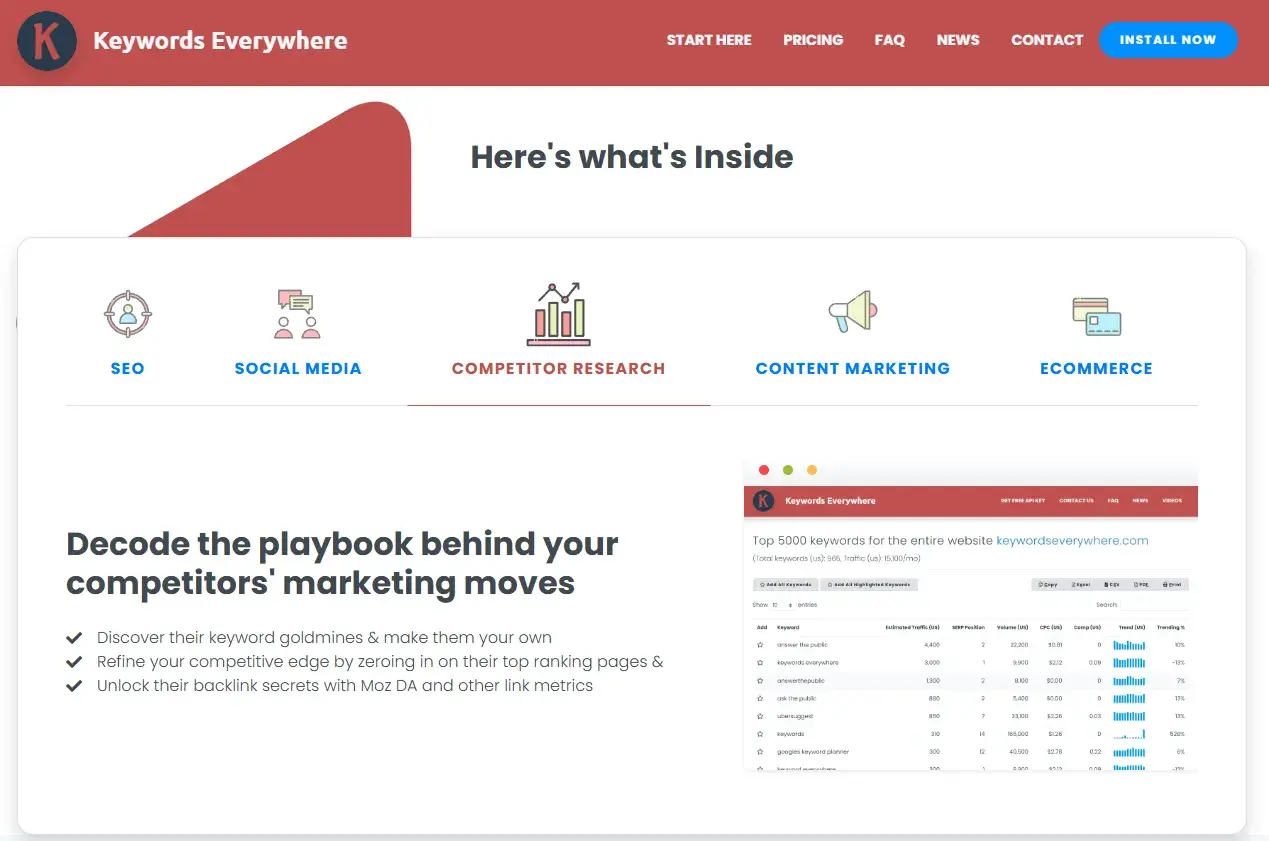
Keywords Everywhere is a lightweight browser extension that surfaces keyword data directly in your Google search results. It removes the need to switch between tools and makes keyword discovery part of your everyday workflow.
Key Features
Displays keyword metrics, including search volume, cost-per-click, and competition scores, inline on Google’s Search Engine Results Pages (SERPs).
Surfaces “People Also Search For” and related keyword suggestions alongside live search results
Best for: Freelancers, solopreneurs, or small teams who want quick keyword insights without committing to a full platform
What I like: I used Keywords Everywhere for years. It used to be completely free, but is now a paid-for platform, though very affordable. I continued to pay for the cheaper package for some time because it’s so helpful. The main reason I liked Keywords Everywhere was because it provided a quick overview of what a page ranks for without having to leave Google SERPs. Plus, the related keywords would inspire new ideas for topics.
Pricing: The bronze package is just $7/month.
When to upgrade: Keywords Everywhere is a paid tool. But considering that it’s so cheap, it’s a tool that’s worth investing in straight away, assuming SEO teams will use it.
Source
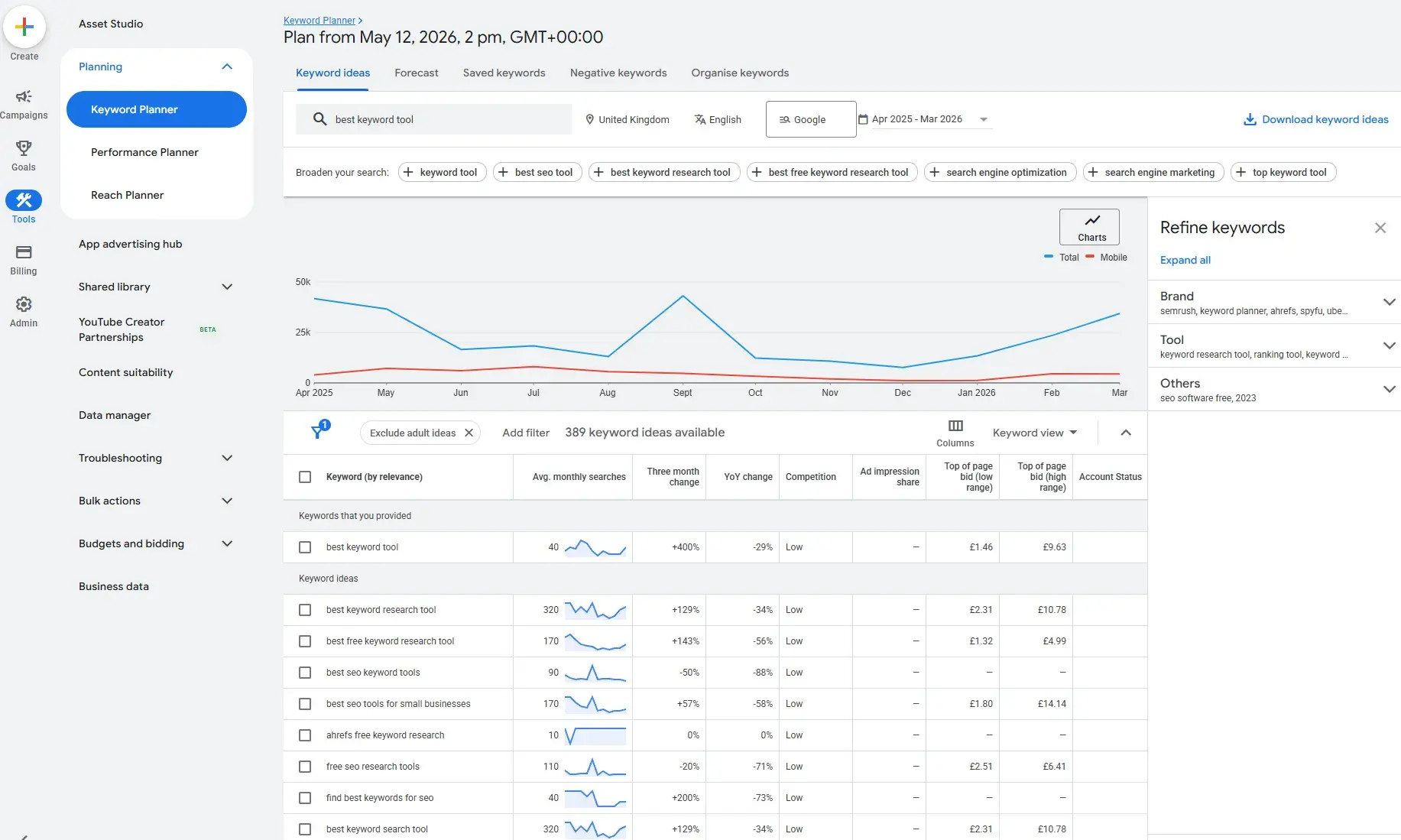
Google Keyword Planner is a free tool within Google Ads that provides keyword ideas, monthly search volume ranges, and competition data sourced directly from Google. While it is officially a paid search tool, keyword findings are transferable to SEO.
Key Features
Generates keyword ideas and search volume estimates based on a seed keyword, URL, or product category.
Provides competition and bid range data that can give SEO teams an idea of organic keyword difficulty. The more expensive the keyword, the more likely it is to be a money-generating keyword, and the more difficult it is to rank for.
Best for: Small businesses with an active or planned Google Ads account who want a no-cost keyword research starting point.
What I like: Google Keyword Planner is completely free, and early in my career, I used it a lot. In fact, when I first started as an SEO consultant, it was the only tool I used for keyword research, and it is perfectly good enough. Eventually, I outgrew the tool and wanted something with a better UX, but I’m still happy to endorse Google Keyword Planner as an excellent, free keyword research solution for small businesses.
Pricing: Free with a Google Ads account. Users need to set up a campaign before Google Keyword Planner is available. Pause the campaign, and Keyword Planner is completely free.
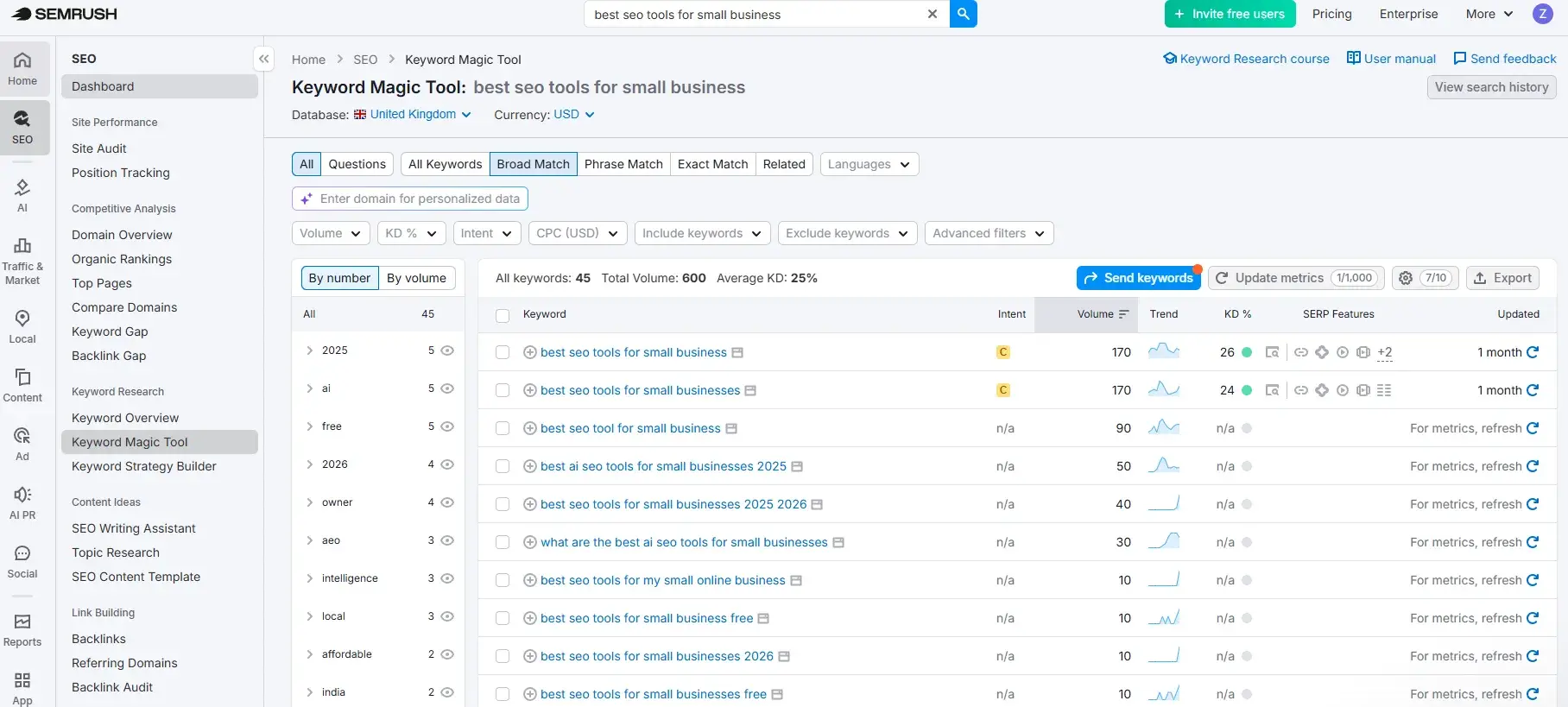
Semrush is one of the most widely used SEO tools on the market. It’s a complete tool for SEO specialists and even includes sophisticated AEO tools within SemrushOne. Its keyword research capabilities are among the most comprehensive available. The Keyword Magic Tool (pictured directly above) provides access to a database of over 25 billion keywords, making it a strong option for small businesses that are ready to move beyond surface-level keyword data and build a more competitive content strategy.
Key Features
Keyword Magic Tool generates thousands of keyword variations from a single seed term, filterable by volume, difficulty, intent, and question format.
Keyword Gap analysis compares keyword profiles against up to four competitors, surfacing opportunities your site is missing.
Best for: Small businesses that are ready to invest in a more data-rich keyword strategy and can make use of the comprehensive functionality available within Semrush, such as site auditing, backlinking audits and backlinking gaps, competitor research, and more.
What I like: Semrush is a long-standing tool in my tech stack. I love it. It’s long been my go-to for keyword research because the Keyword Magic Tool is easy to use and very comprehensive. Type in a seed keyword and receive recommendations for similar keywords. The intent filtering is particularly useful for establishing which keywords are informational and which are transactional. I start every single strategy with a transactional keyword, then build content out from there, and Semrush makes this easy.
Pricing: Paid plans for classic (SEO only Semrush) start at $139.95/month.
When to upgrade: There is a free plan available with limited daily searches, but any SEO team will quickly outgrow this Upgrade to Semrush when SEO teams require multiple tools for different purposes (such as content, technical and SEO) or the team wants to compare competitor strategies or track keyword positions.
Technical SEO and Site Audit Tools
Strong keyword research and great content will only take a business so far if the underlying structure of your website isn’t working. Technical SEO tools detect crawl, speed, indexing, and metadata issues that can quietly suppress your rankings, often with no obvious “symptoms” until traffic drops.
Catching technical SEO issues early is far less costly than trying to recover from them later. The following tools help SEO teams capture these issues before they cause significant harm.
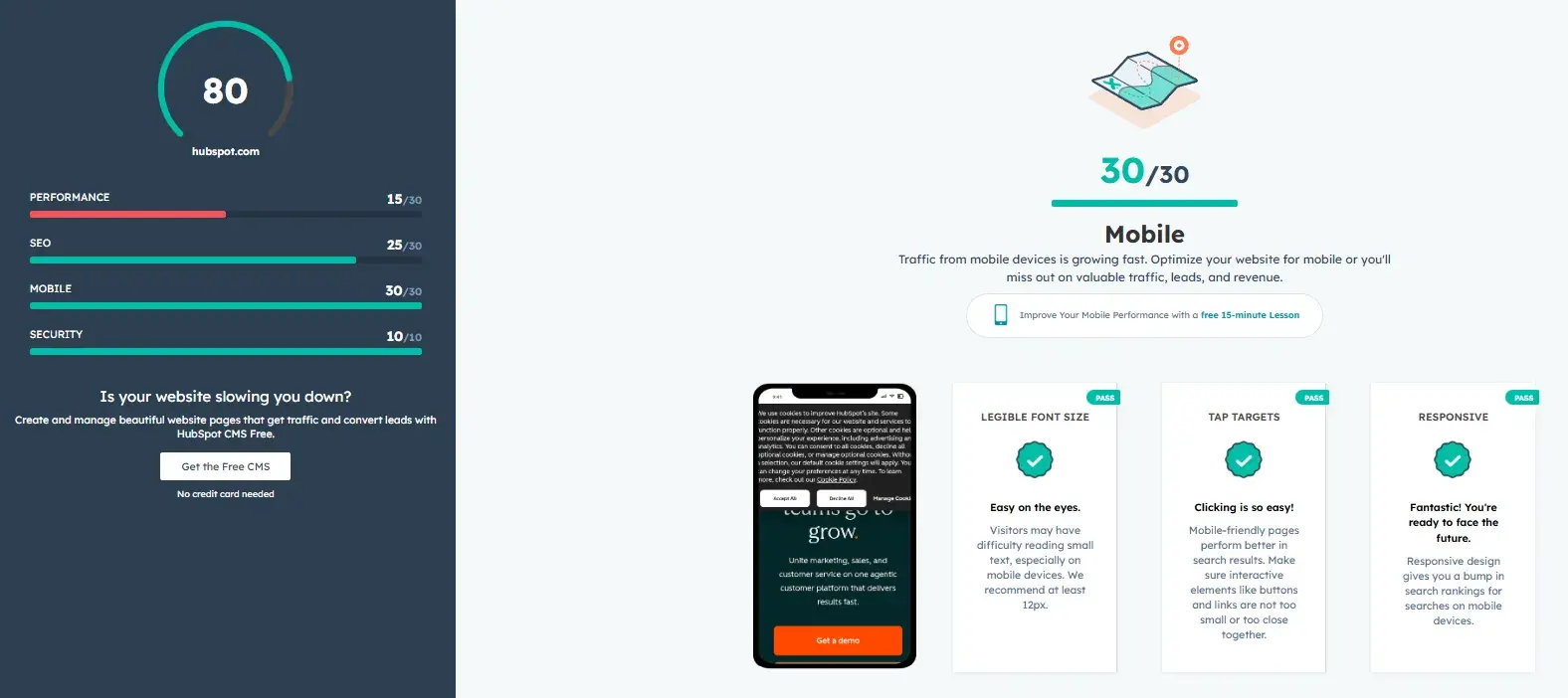
HubSpot’s Website Grader provides a free technical audit starting point for small businesses who want a clear, jargon-free snapshot of how their website is performing.
To use Website Grader, simply enter your URL and email address, and within seconds the tool provides a scored report covering performance, SEO, mobile readiness, and security.
Helpfully, there’s a plain-English explanation of what each finding means and why it matters.
Unlike enterprise audit tools that surface hundreds of issues with little guidance on where to begin, Website Grader is actionable. The report includes recommendations that any SEO team can act on.
For small businesses doing a first audit or trying to make the case internally for SEO investment, it’s one of the most accessible entry points available. It won’t replace a full technical crawl as your site grows in complexity, but it provides a fast, reliable baseline and a clear list of priorities to work from.
Key Features
Instant audits with recommendations across SEO, mobile, and security with plain-English recommendations for each finding
Identifies key technical issues, including missing meta descriptions, slow page load times, and HTTPS status, that directly affect search visibility
Best for: Small businesses running their first technical audit, or teams that need a quick, shareable snapshot of site health without the complexity of an enterprise crawl tool.
What I like: Website Grader is free and easy to use. If budgets are tight, then SEO teams can use this tool to get a snapshot of a website’s performance. They can use the report as a first port of call for issues to resolve, then move onto something more in-depth once the foundations are completed.
Pricing: Free, no account required
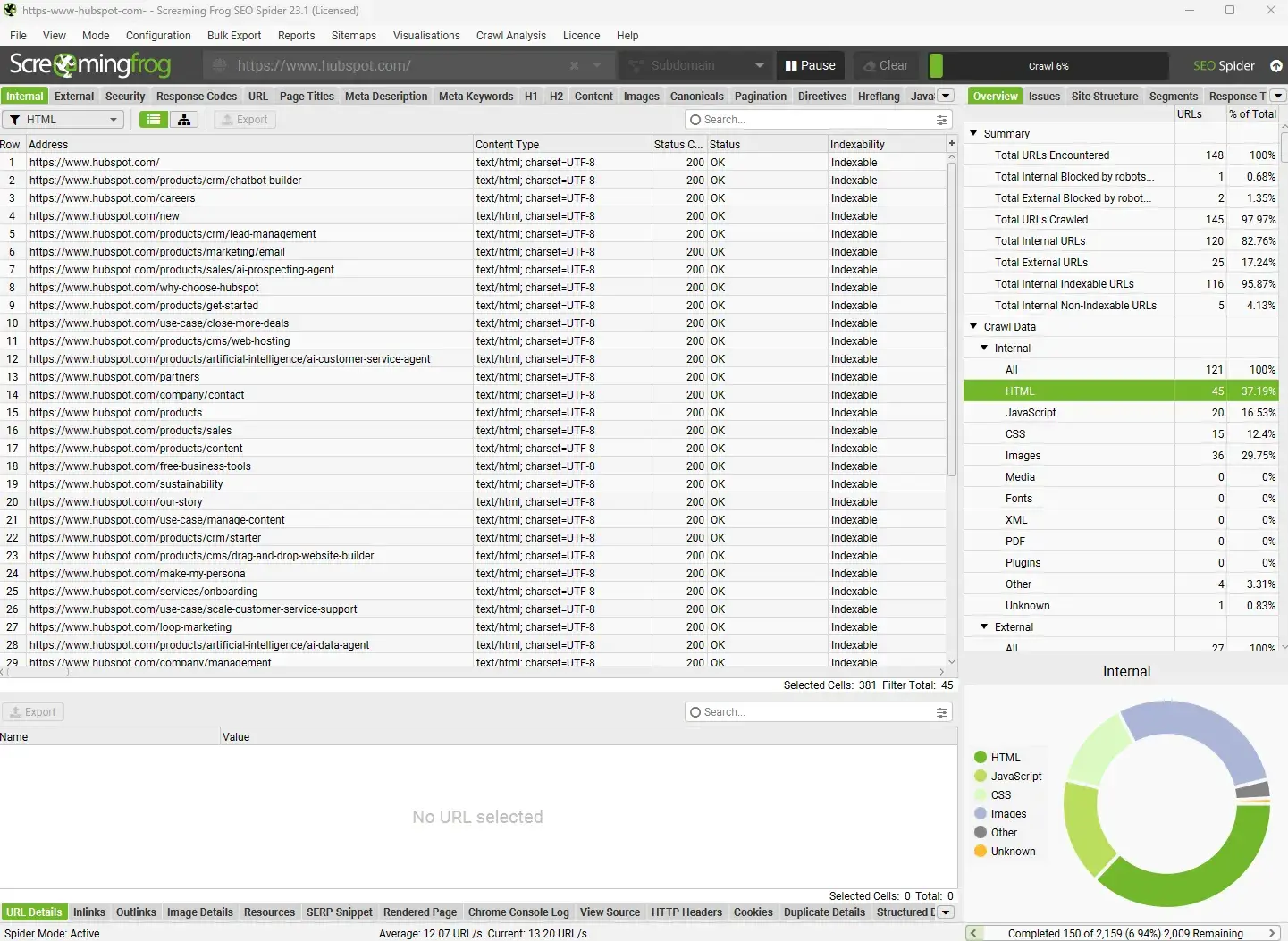
Screaming Frog is a desktop-based website crawler that pulls a technical picture of your entire site, including things like:
Broken links
Redirect chains
Missing title tags
Duplicate content
Page speed data
Schema
Key Features
Crawls your entire website and surfaces technical issues, including broken links, duplicate metadata, missing alt text, redirect chains, and crawl errors
Integrates with popular SEO tools like Google Analytics, Google Search Console, Ahrefs, Majestic, and PageSpeed Insights to layer performance and traffic data onto crawl findings
Best for: Small businesses with growing websites that need a thorough, page-by-page technical audit and have at least one team member comfortable working with structured data exports.
What I like: Aside from the core features above, I love using Screaming Frog (paid) with Google Search Console (GSC) and Google Analytics (GA4). The API connects all three tools, and Screaming Frog’s export includes data like the website URL, clicks from GSC, page views from GA4, and more. When conducting a content analysis, I like to see all the data in one spreadsheet. It helps me decide what to do with a piece of content. For example, looking at clicks alone might make it look like a page isn’t doing anything for a business, but if the page is getting visitors from other marketing channels, these show up in page views in GA4. It provides a holistic view of what’s going on.
Pricing: Free for up to 500 URLs. Paid licenses are $279/year with discounts for five or more licenses.
When to upgrade: If you’re regularly crawling sites with over 500 URLs, need scheduled crawls, or want to connect crawl data with Google Analytics and Search Console.
Important note: Screaming Frog is excellent, but it is quite a technical tool, and users must have the skills to use the tool and decipher the findings and their solutions independently. If an SEO team isn’t well-versed in technical SEO, alternative tools, like HubSpot’s SEO Recommendations, are an excellent option instead.
Source
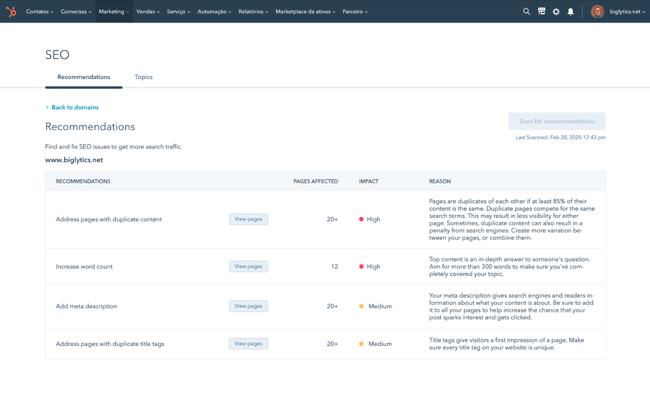
Rather than presenting a raw audit, HubSpot’s SEO recommendations, built into Marketing Hub, surface the technical recommendation within a table alongside the:
Page link so it’s easily viewed.
Number of pages affected to help developers identify common themes and identify where they can fix the issue.
Impact to help prioritization of issues (start with high-impact issues first).
Reason, which is a plain-English rationale for what the recommendation is and how to resolve it.
With HubSpot’s SEO recommendations, teams spend less time interpreting data and more time making improvements that actually get meaningful results. Other benefits to small businesses include:
Users don’t need to be a technical SEO expert to work through the recommendations list.
Each suggestion comes with a clear explanation of what the issue is, why it matters for search performance, and what to do about it.
HubSpot users can view your SEO recommendations inside HubSpot from a single dashboard, and understand the reasoning behind each recommendation so your team builds SEO knowledge as they work through fixes.
Because the tool lives inside HubSpot’s CMS and marketing platform, recommendations update as your content evolves. For example, if the content team publishes a new blog post with a missing H1, SEO will know about it straight away. The dynamic nature of the recommendations list means your technical SEO health improves continuously alongside your content output, rather than in periodic audit cycles.
Key Features
Prioritized, in-platform SEO recommendations covering metadata, internal linking, content quality, and on-page signals. These recommendations are updated dynamically as your site content changes.
Plain-English explanations of each issue surfaced and clear guidance on how to resolve it, making technical SEO accessible to non-specialists.
Best for: Teams already using, or open to using, HubSpot’s CMS or Marketing Hub.
What I like: HubSpot offers a lot to growing businesses. It can scale to an enterprise level, so small businesses that start with it can be reassured that they’ll never outgrow the tool or need to change. I use HubSpot for my own small business. The CRM is great — I track all my leads there and have started email marketing there, too. It’s worth looking at what else HubSpot offers if you’re after technical SEO recommendations. For example, SEO recommendations are available in the free edition, but upgrading to Marketing Hub Professional unlocks CRM segmentation, live chat, marketing automation, and so much more.
Pricing: HubSpot’s SEO recommendations are available across all plans, including the free edition. Marketing Hub Professional (from $800/month, billed annually) unlocks additional capabilities including advanced marketing automation, custom reporting, and omni-channel campaigns.
When to upgrade: Features available within Marketing Hub will quickly replace multiple tools. As soon as you’re logging into two marketing tools or more, as well as a CRM, Marketing Hub is a must-consider.
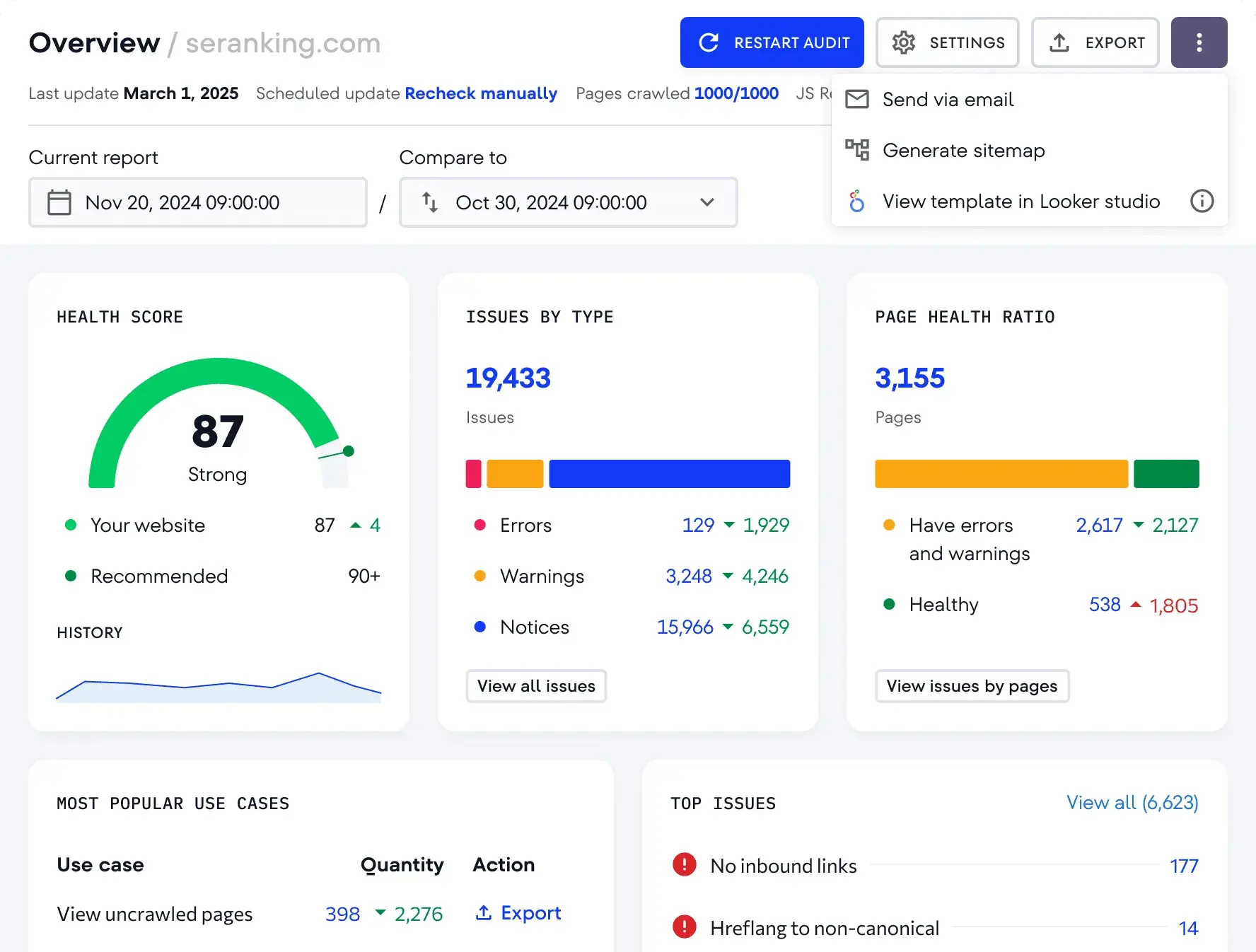
SE Ranking is an all-in-one search engine optimization software platform, like Semrush or Ahrefs (mentioned later), but it’s a cheaper option than both. SE Ranking’s audit tool crawls your website and scores it. Like HubSpot’s SEO recommendations, this tool groups issues by severity so your team knows exactly where to focus first.
Key Features
Comprehensive site audit including Core Web Vitals, page speed, crawlability, internal linking structure, and on-page optimization signals.
Issues are categorized by severity, including errors, warnings, and notices, with actionable fix guidance for each, making it accessible to teams without deep technical expertise.
Best for: Small businesses and lean marketing teams that want an affordable all-in-one platform with solid technical audit capabilities.
What I like: SE Ranking is an excellent and affordable comprehensive SEO tool. I used to use the technical auditing feature more than any other tool. SE Ranking is cheaper than Semrush, which is why I switched many years ago, but I switched back to Semrush because it had more data and I really liked the competitor tools on Semrush.
Pricing: Plans start at $103/month
When to upgrade: If your site is growing rapidly, you’re managing SEO across multiple domains, or need white-label reporting for clients or stakeholders, SE Ranking’s higher tiers offer the additional capacity and customization to match.
Featured Resource: Technical SEO Tools You Should Be Using Today.
Content Optimization and On‑page Tools
Content optimization tools improve on-page relevance and content coverage. The tools in this category help small businesses close the gap between content that exists and content that actually ranks.
Source
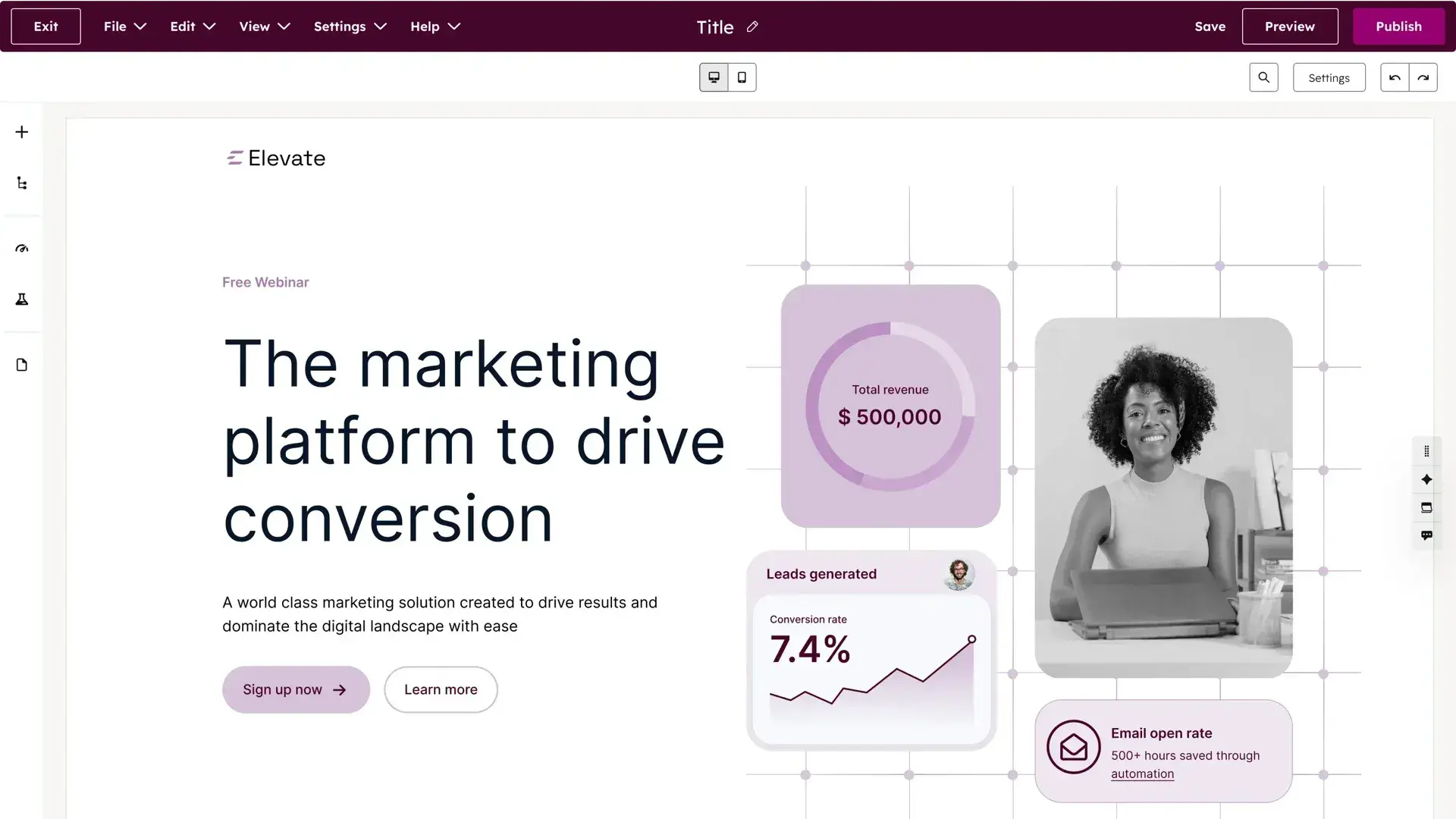
HubSpot’s Content Hub is a complete content solution that unites content creation, optimization, and performance tracking in a single platform. And if you’re a HubSpot user, it’s connected to your CRM, contact data, and marketing analytics.
Content creators can use Content Hub to build website pages, including landing pages, without a developer. There are full-page templates available, equipped with page contents, hero sections, footers, and modules suitable for the page. Here’s a look at the pricing page template using the drag-and-drop builder:
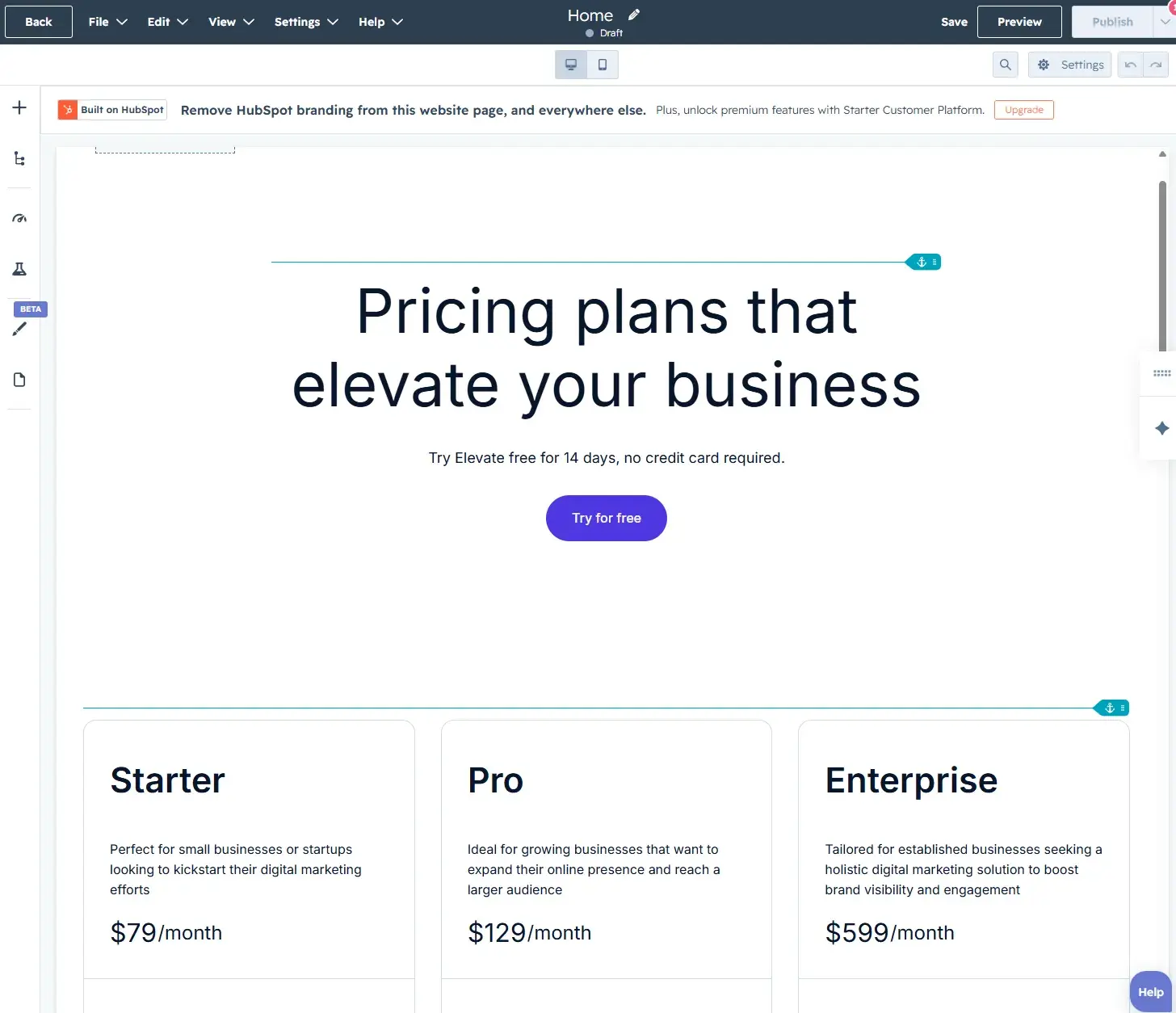
For those using Content Hub Professional, videos, podcasts, case studies, and more are available. Plus, users can build pages using generative AI.
For optimization, HubSpot surfaces on-page guidance including things like keyword placement, internal linking opportunities, metadata completeness, and mobile readiness, so content leaves the editor in the best possible shape. It means content writers can independently achieve the SEO goals, leaving SEO specialists with an editing or reviewing task only.
Beyond individual page optimization, Content Hub supports a topic cluster approach to content strategy. The topic cluster approach maps pillar pages to supporting blog posts and subtopic content, with HubSpot tracking how the cluster performs as a whole, not just individual pages in isolation. This is particularly valuable for small businesses that are building topical authority over time, because it shows which clusters are gaining traction, which subtopics need strengthening, and where your next piece of content should focus.
The AI-assisted content tools within Content Hub are worth highlighting for lean teams. Features like the AI blog writer and paragraph rewriter help small teams maintain publishing consistency without needing to scale headcount. With Content Hub, content teams can produce more content, more frequently, without sacrificing quality or SEO alignment.
Because Content Hub sits inside the HubSpot ecosystem, content performance data connects directly to contact and revenue records. See which pages are driving organic traffic and which pieces of content are generating leads, influencing deals, and contributing to pipeline. This is a level of attribution that most standalone content tools simply cannot offer because CMS integration is a must-have for this level of analysis.
Key Features
Integrated on-page optimization guidance surfaced in the content editor, covering keywords, metadata, internal links, and mobile performance as writers produce and publish content.
Topic cluster management with performance tracking across pillar pages and subtopic content, connected to traffic, lead, and revenue data in HubSpot Smart CRM.
Best for: Small businesses and growing marketing teams that want content creation, SEO optimization, and performance analytics in one connected platform.
What I like: Content Hub makes page design and development so easy that even I can do it — and I’m truly no page designer. The ability to begin with a template takes a lot of the hard work out of designing a page. I don’t have to think about what to include to deliver an excellent UX, and the templates have already handled design nuances like padding or spacing.
Pricing: Content Hub Starter begins at $20/month. The Pro package is $500, but remember to check what else is unlocked with an upgrade. Functionality within Content Hub goes beyond SEO, and it’s possible that investing in Content Hub could save the business money elsewhere. For example, the Pro package includes AI creation tools and reporting features that may help reporting workflows.
When to upgrade: If your team is publishing content regularly and needs to connect that output to lead generation and revenue outcomes, Content Hub Pro is where the platform’s full value becomes apparent.
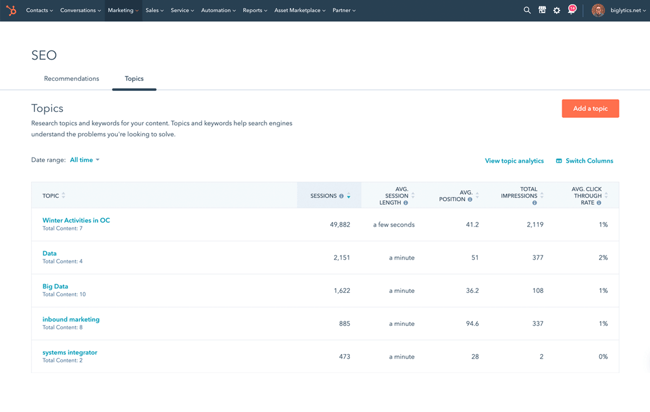
HubSpot’s SEO Performance Analysis tool closes that loop by connecting your Google Search Console data directly to your HubSpot content and CRM.
Once users have connected HubSpot with Google Search Console — which literally takes a minute to do — HubSpot’s SEO Performance Analysis provides a live view of how your content is performing in organic search. With the data available within SEO Performance Analysis, SEO teams and writers can edit and refine on-page SEO strategy. At the top level, there are five key metrics across your entire site:
Total pages
Total impressions
Total clicks
Average click-through rate
Average position
Teams can analyze the data of individual pages using these filters. SEO analysts can compare up to ten pages against a specific metric and export performance data for reporting or stakeholder presentations.
What makes this extra powerful for small teams is the topic cluster layer. The Topics tab shows how content clusters (content grouped around a core theme) are performing as a whole — not just individual pages — providing a view of:
Organic sessions
Average session length
Bounce rate
Monthly search volume
This means SEO analysts can identify whether a pillar page is genuinely pulling traffic from its supporting subtopic content, or whether a cluster needs restructuring before it ranks.
SEO analytics tools connect traffic and content performance to leads, pipeline, and revenue, and that is exactly what HubSpot’s SEO Performance Analysis does better than anything on the market. Because the data flows directly into HubSpot Smart CRM, SEO analysts can move beyond traffic metrics and see which search-driven pages are generating contacts, influencing deals, and contributing to revenue. For small businesses that need to justify SEO spend, this is one of the most direct lines from organic performance to business outcome available in any tool at this price point.
Key Features
Google Search Console integration that surfaces impressions, clicks, CTR, and average position data at both site-wide and individual page level, with the ability to compare up to ten pages simultaneously.
Topic cluster performance tracking that shows how groups of related content are performing in organic search, with traffic and engagement data tied directly to HubSpot Smart CRM contact and revenue records.
Best for: HubSpot Marketing Hub users who want to move beyond basic traffic reporting and connect their SEO performance data to lead generation and pipeline outcomes.
What I like: Google Search Console data is a must-review for SEO analysts. Tools like Semrush, Ahrefs, or SE Ranking are excellent, but unlike GSC they can’t show exactly what’s happening on your site. GSC is source data. Having it integrated into HubSpot means SEO teams can manage their analysis from the same tool they’re using for optimization, content creating, managing leads and sales, and more. Plus, leadership can see organic performance alongside pipeline data in one place helping SEO to demonstrate it’s value to business.
Pricing: Available within Marketing Hub Professional and Enterprise and Content Hub Professional and Enterprise
When to upgrade: This feature requires a Professional-level subscription, so the upgrade decision comes down to whether the broader suite of Professional features — automation, custom reporting, and advanced personalization — justifies the investment alongside the SEO analytics access.
Source
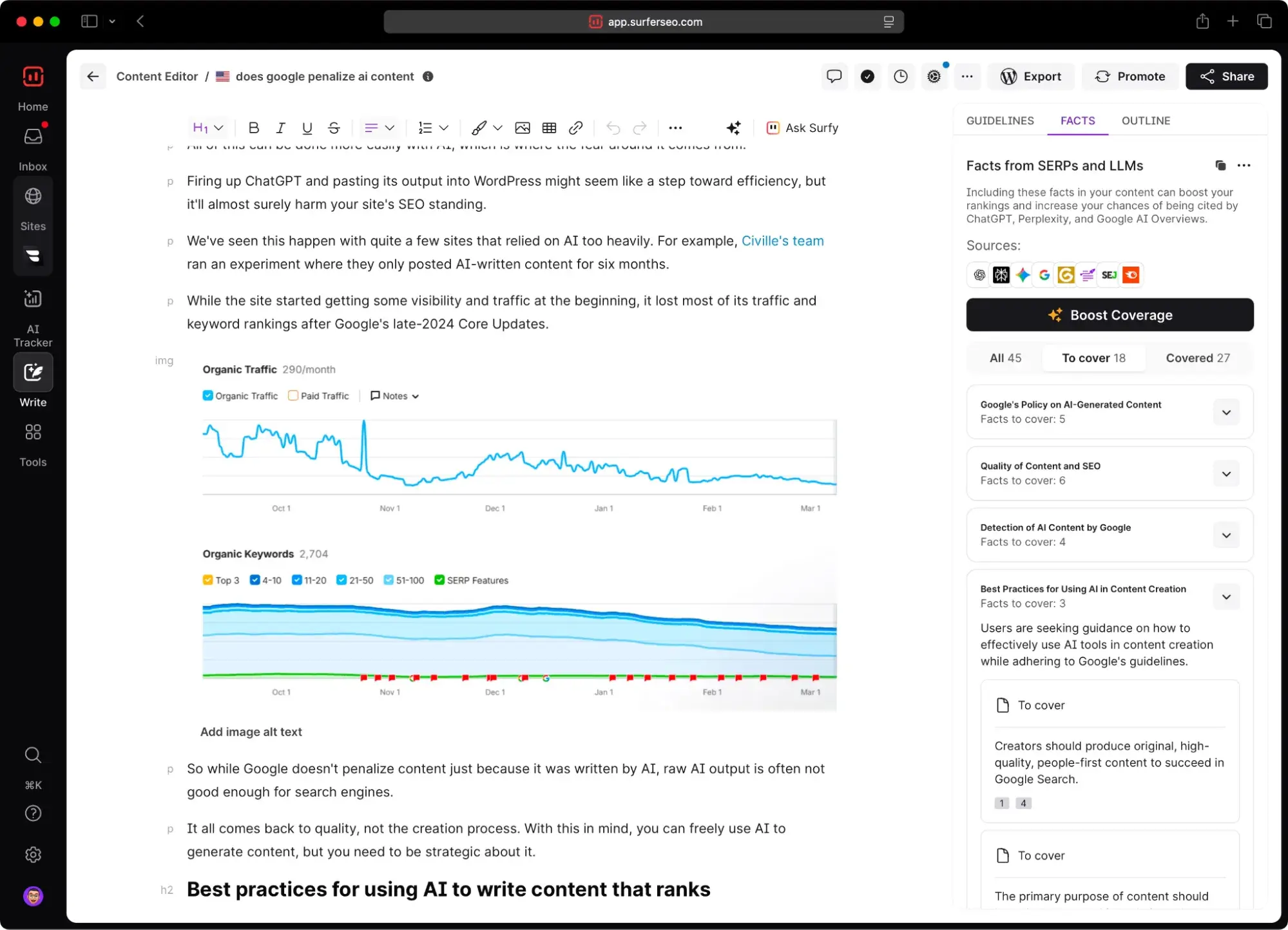
Surfer SEO is a long-standing and industry-trusted content optimization platform that analyzes the top-ranking pages for any keyword. The content editor shows exactly what your content needs to compete in SERPs. Surfer uses real SERP data to generate a content score and specific SEO recommendations, covering word count, keyword density, headings structure, and NLP terms. In line with modern search marketing, it now includes AEO recommendations.
Key Features
Content Editor provides a real-time content score and keyword recommendations based on a live analysis of top-ranking competitor pages, so your team is optimizing against actual SERP benchmarks rather than generic guidelines.
The audit tool evaluates existing pages against current top-ranking competitors and surfaces specific gaps in keyword usage, content length, and structure that may hinder rankings.
Best for: Small businesses and content teams that are already producing SEO content regularly and want data-driven guidance on how to close the gap between their existing pages and the top-ranking results for their target keywords
What I like: I used to use Surfer SEO a lot. It’s an excellent tool that bridges the gap between SEO and writing teams and helps writers integrate SEO into their content. Sometimes, small businesses that have little budget can use Surfer SEO to optimize content even without an SEO team member present; however, an SEO specialist will need to create the strategy.
Pricing: Plans start at $99/month.
When to upgrade: If you’re producing content at volume and find that pages aren’t ranking despite solid keyword targeting, Surfer’s audit and content scoring tools are well worth the investment to diagnose and close the gap.
Backlink Research and Outreach Tools
The tools in this category help marketers understand their current link profile, identify opportunities to earn new links, and monitor what competitors are doing.
Source
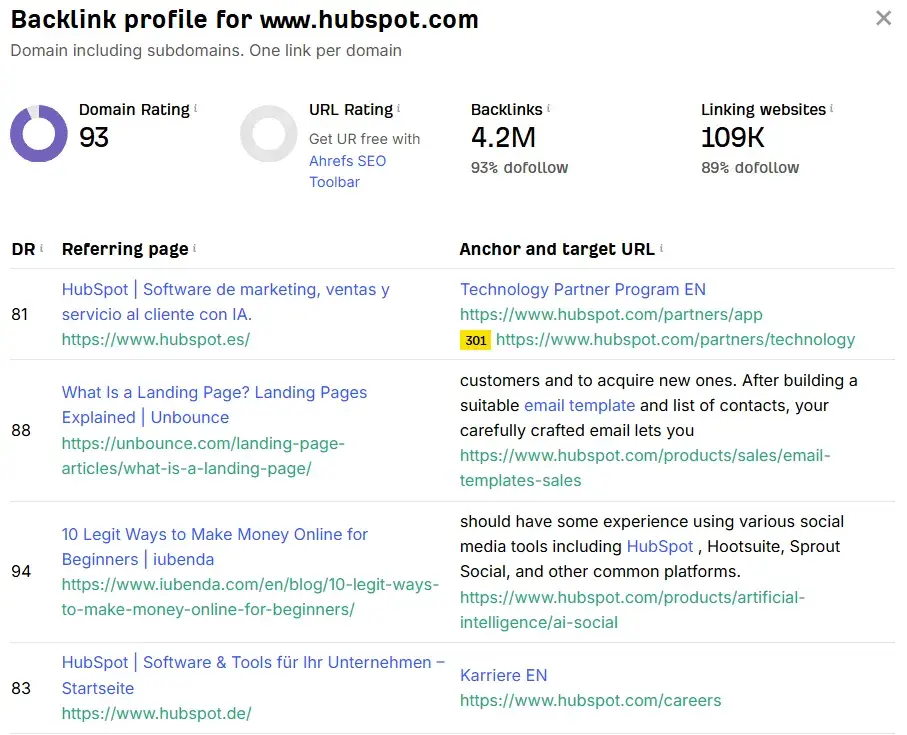
Ahrefs is one of the most trusted backlink research tools available, with one of the largest and most frequently updated link databases in the industry. For small businesses that are serious about link building as part of their SEO strategy, Ahrefs provides the depth of data needed to move from guesswork to a deliberate, repeatable outreach process.
Key Features
Site Explorer provides a comprehensive view of any website’s backlink profile, including referring domains, anchor text distribution, link quality scores, and newly gained or lost links, for your own site or any competitor’s site.
Link Intersect tool identifies websites that are linking to your competitors but not to you, surfacing warm outreach targets that already have a showed interest in your topic area
Best for: Small businesses with an active link building strategy that need reliable, deep backlink data and competitive link intelligence to prioritize outreach efforts
What I like: Ahrefs is an excellent tool, and it’s more comprehensive than just offering backlink audits and gaps. I’ve included it as a backlinking tool as it has notoriety in the industry for being good at it, and the backlinking capabilities often separate it from competitors like Semrush or SE Ranking.
Pricing: Try Ahref’s backlink checker for free. Comprehensive plans start at $129/month, but for small businesses there is a free plan and a starter package costing $29/month with limited capabilities.
When to upgrade: If you’re actively pursuing link building as a growth channel and need to scale outreach beyond manual research, the full Ahrefs suite pays for itself quickly in the time saved identifying quality targets.
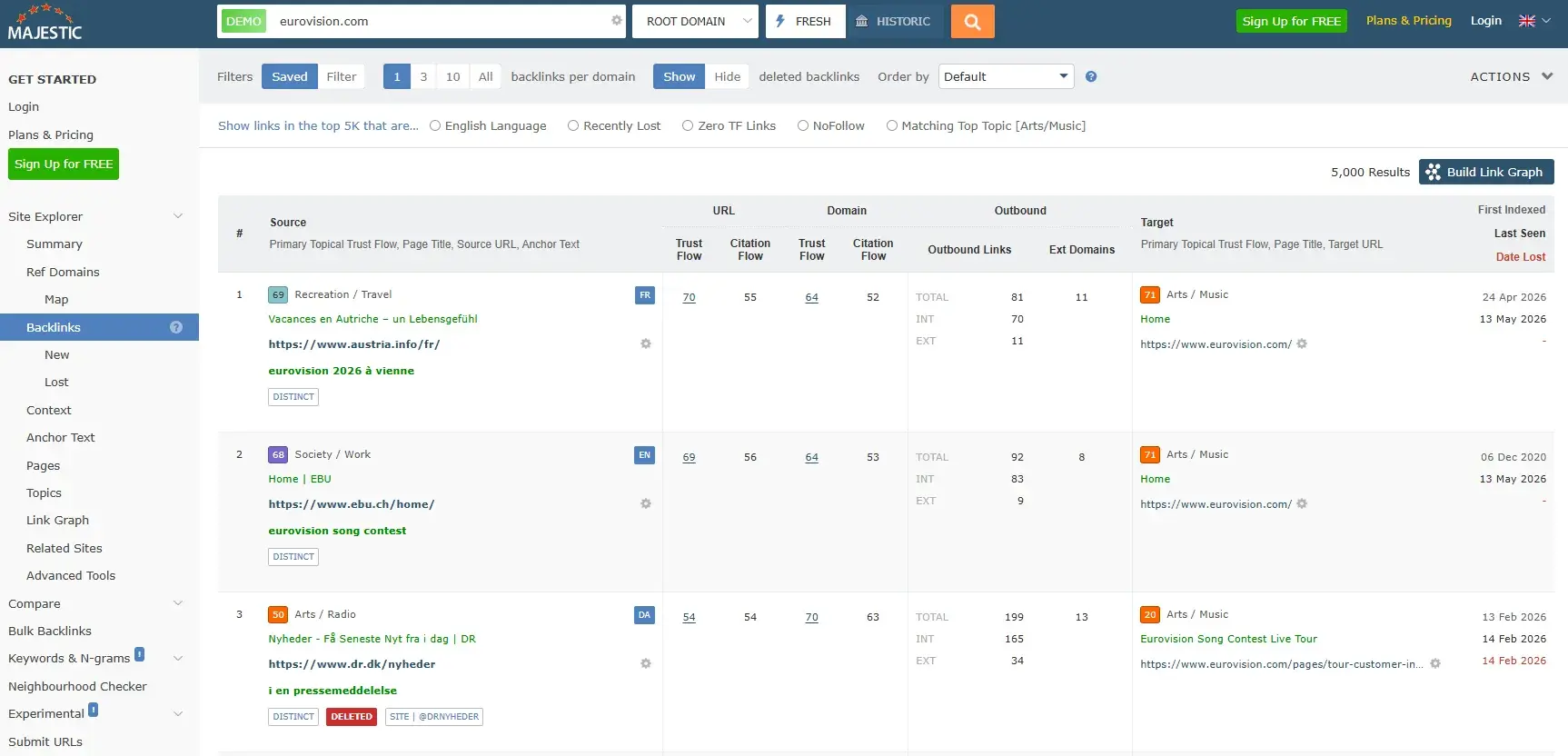
Majestic is a specialist backlink tool with one of the longest-running independent link databases available. Where broader platforms like Ahrefs combine backlink research with keyword and rank tracking, Majestic goes deep on link data specifically. It’s a sound choice for businesses that want granular link analysis without paying for features they don’t need.
Key Features
Propriety metrics, Trust Flow and Citation Flow, provide a quick quality assessment of any backlink profile, helping teams evaluate the authority of potential link targets and filter out low-quality or spammy domains before investing time in outreach.
Bulk backlink checker and historic index allow analysts to review link profiles at scale and track how a domain’s link authority has changed over time, useful for competitive research and due diligence on link prospects.
Best for: Small businesses or SEO professionals who need specialist backlink intelligence and link quality scoring without the overhead cost of a full all-in-one platform
What I like: Majestic is a long-standing SEO tool in the industry. I trust what they’re doing and have used the tool for analyzing backlinks. I’ve also spoken to the team at events and found them to be really helpful, which may benefit SEO teams who need extra support.
Pricing: Plans start at $49.99/month, making it one of the more affordable specialist backlink tools available.
When to upgrade: If your link building program is maturing and outreach teams are analyzing competitor link profiles at scale, cross-reference link prospects in bulk, or integrate link data into broader reporting workflows, the Pro or API tiers offer the additional capacity and flexibility to match.
Rank Tracking Tools
Rank tracking tools measure position changes for target keywords over time, giving teams the visibility to know what’s working, what’s slipping, and where to focus optimization efforts next.
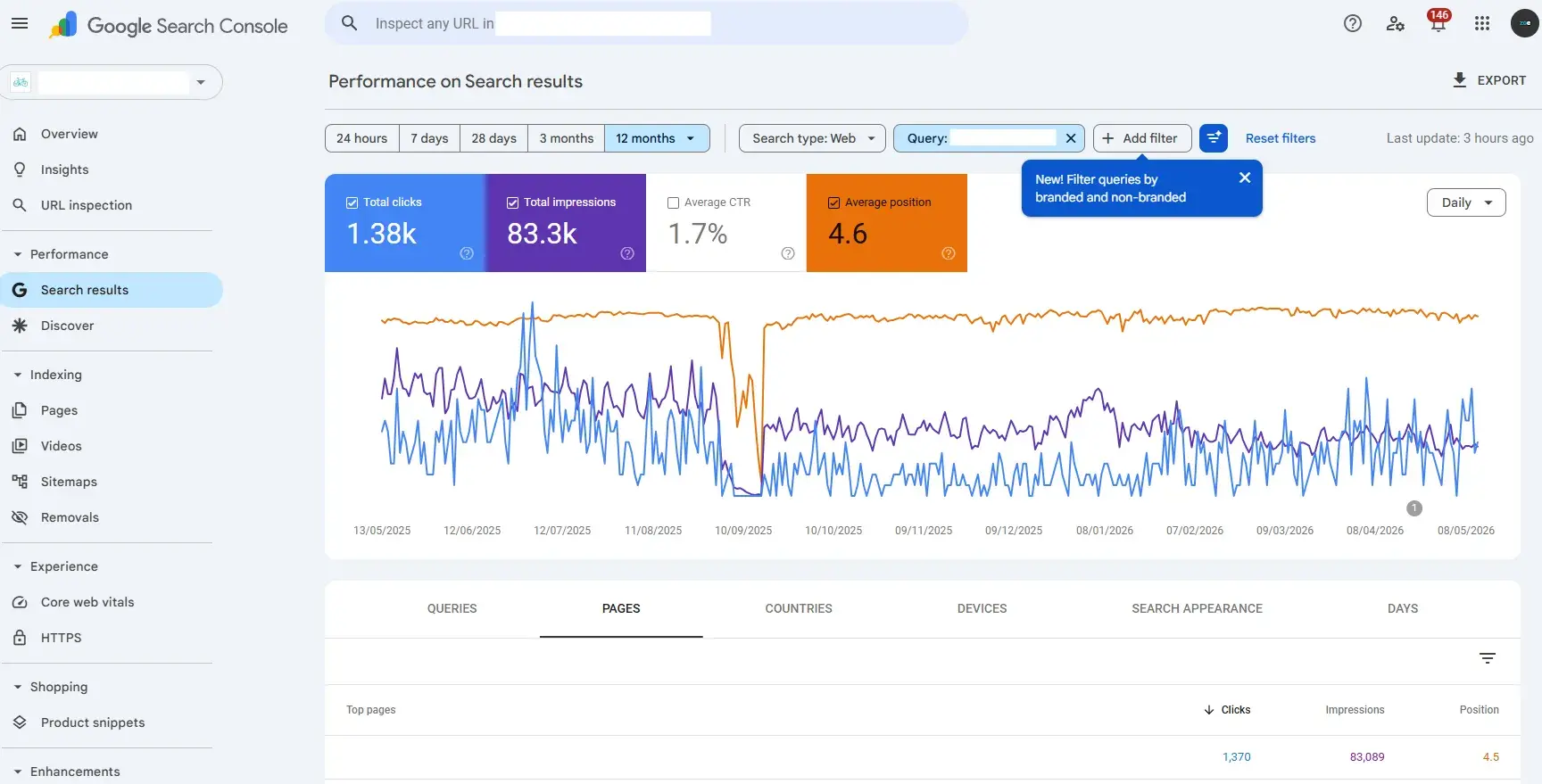
Google Search Console shows search queries, indexing status, and site performance data, all sourced directly from Google, and all completely free.
For small businesses starting out with rank tracking, Google Search Console is the most logical first tool to set up, not only because it’s free but because the data comes straight from the source.
The Performance report is the core of Search Console’s rank-tracking value. Filter by query, page, country, device, and date range, and compare periods to see whether positions are improving or declining.
The tool’s limitation, compared to paid rank tracker tools, is that it won’t provide daily position updates or the granular keyword tracking of a dedicated tool, but for a small business building its SEO foundation, it provides more than enough signal to prioritize the right work.
Key Features
Performance reports surface the exact queries driving impressions and clicks to your site, with average position, click-through rate, and impression data filterable by page, device, country, and date range.
Index Coverage report shows which pages Google has successfully crawled and indexed, and flags any pages that are excluded or experiencing errors.
Best for: Small businesses at any stage that want reliable, first-party ranking and performance data directly from Google at no cost.
What I like: Google Search Console is a must-have for all businesses, small and enterprise. It’s incredibly useful, and as an SEO consultant, I log into it every single day. Use “Average Position” to see how your keywords or pages are ranking. Remember: it’s average position so rankings will have fluctuated. Use filters to get the most accurate results about how specific keywords are performing and filter by the countries the website is supposed to be ranking.
Pricing: Free
Source
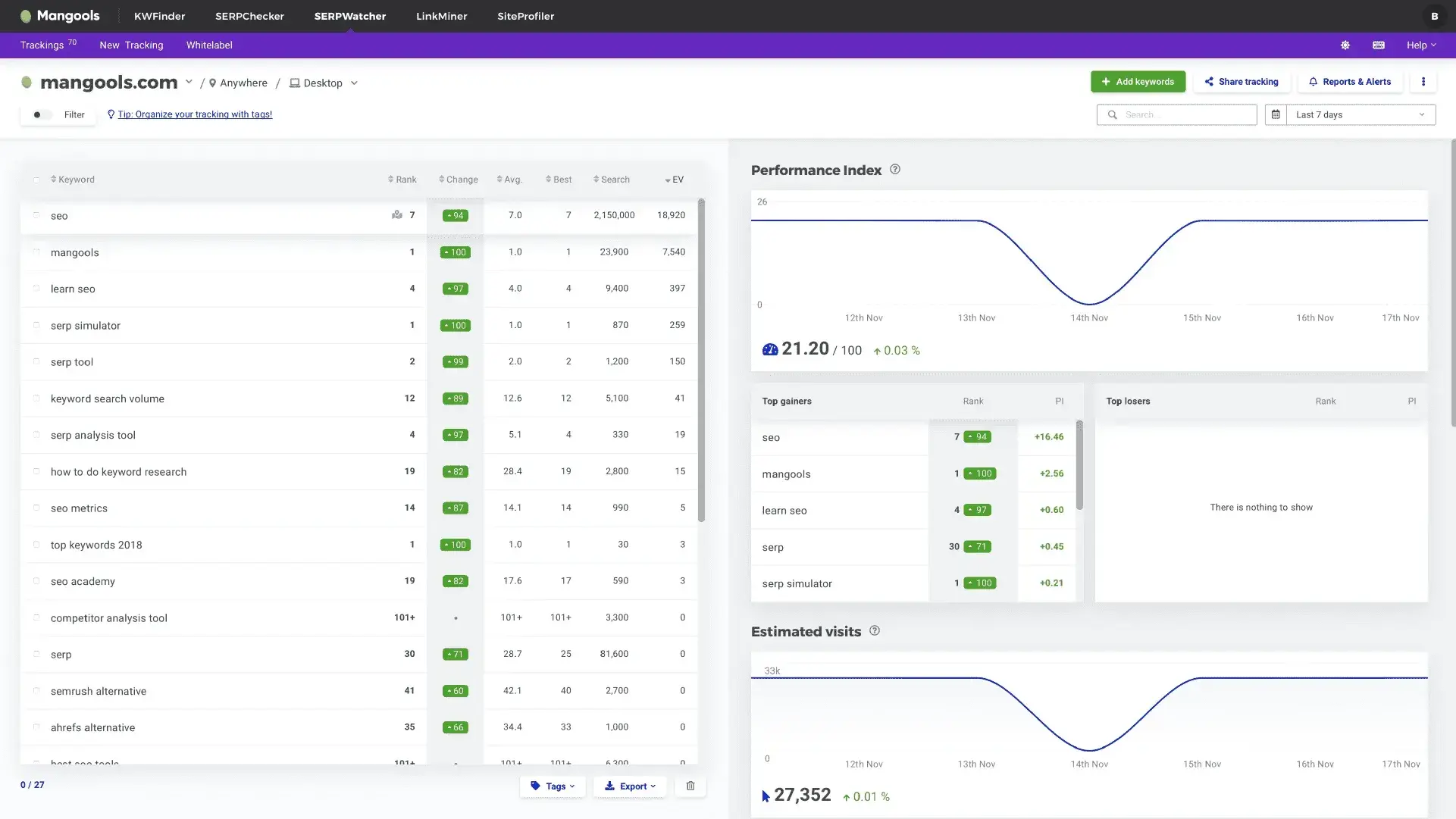
SERPWatcher is a dedicated rank tracking tool from Mangools. Where Google Search Console provides a broad view of query performance across your entire site, SERPWatcher tracks specific target keywords with daily position updates and trend visualization.
Key Features
Daily rank tracking for target keywords across desktop and mobile, with position history charts and trend data that make it easy to spot improvements or declines at a glance.
Dominance Index provides an aggregate performance score across your full tracked keyword set, so SEO teams can assess the overall health of your ranking portfolio rather than focusing on individual keyword movements in isolation.
Best for: Small businesses and solo marketers that want an affordable, easy-to-use dedicated rank tracker with daily updates and clear trend visualization, without the complexity or cost of an enterprise platform.
What I like: Unlike GSC, SEO teams can use SERPWatcher to set up keyword tracking once, and the tool will continuously monitor those rankings. In Google Search Console, users have to reapply filters and rebuild views each time.
Pricing: SERPWatcher starts at $37.70/month.
When to upgrade: As soon as SEO teams are tracking multiple rankings and workflows benefit from a dedicated tool that continuously updates.
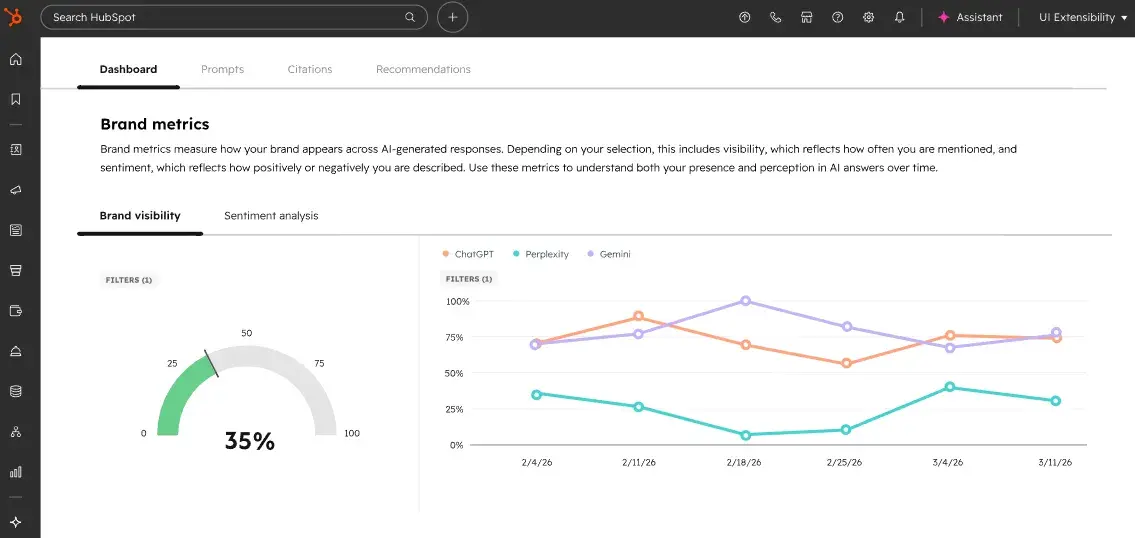
HubSpot AEO evaluates brand visibility in AI search results. It helps the search marketing team go beyond traditional search by giving them a clear picture of whether and how a brand is showing up when AI tools answer questions relevant to your business, products, or industry.
Think of it as a rank tracker for the AI era. Rather than monitoring a website’s position in SERPs, search teams are monitoring a website’s presence in the answers that AI engines are serving directly to potential customers. HubSpot AEO provides four metrics:
A visibility score
Prompt tracking
Citation analysis
Prioritized recommendations
Brand Visibility Score is the headline metric and an indicator of how often a brand appears in AI answers across tracked prompts, expressed as a percentage. It provides a single, trackable number that communicates AI search presence to leadership without requiring them to understand the mechanics of how answer engines work.
Prompt Tracking solves one of the most common frustrations with AEO as a discipline: not knowing which questions to monitor. HubSpot AEO suggests prompts based on what it already knows about a business and buyers, drawing on CRM data to surface the questions that actual customers will likely ask AI engines, rather than requiring a team to guess.
Citation Analysis shows which domains and pages are being referenced in AI answers.
Sentiment Analysis adds a qualitative layer that pure visibility tracking misses. Sentiment analysis measures whether AI is describing your brand positively, negatively, or neutrally when it mentions you, on a scale from -100 to +100. This matters because if an answer engine is citing your brand in a negative context, that’s a reputation risk that traditional SEO tools would never surface.
What distinguishes HubSpot AEO from standalone AEO tools is the integration with the broader HubSpot ecosystem. Marketers can act on gap recommendations inside HubSpot, where they can create content or update existing pages without leaving HubSpot. For lean small business teams, the closed loop between insight and action is significant.
Key Features
Four core AEO metrics: Brand Visibility Score, Prompt Tracking, Citation Analysis, and Sentiment Analysis across ChatGPT, Gemini, and Perplexity, with CRM-powered prompt suggestions that surface the questions your actual buyers are asking AI engines, rather than requiring manual guesswork.
Prioritized, actionable recommendations tied directly to citation and visibility gaps, with the ability to act on those recommendations inside HubSpot without switching platforms, connecting AI search visibility to content creation, CRM data, and pipeline outcomes in one place.
Best for: Small businesses and marketing teams that are already managing traditional SEO and want to extend that visibility tracking into AI search. HubSpot AEOl is particularly useful for those in competitive categories where AI-generated answers are influencing how customers discover and evaluate options before ever visiting a website
What I like: The CRM-powered prompt suggestions genuinely set HubSpot AEO apart from the growing field of standalone AEO tools. Rather than handing a blank prompt builder, it takes the guesswork out of what buyers are searching for in ChatGPT. HubSpot uses what it already knows about your business and contacts to surface the prompts that actually matter, which means small teams spend less time on setup and more time acting on insights that apply to their specific buyers.
Pricing: HubSpot AEO is included with Marketing Hub Pro and Enterprise editions and is also available as a standalone subscription for $50/month.
When to upgrade: If your team has noticed organic traffic plateauing or declining despite solid traditional rankings, or if you’re in a category where AI Overviews and chatbot answers are visibly influencing how customers discover and evaluate solutions, HubSpot AEO makes that shift measurable and provides a clear action plan to respond to it.
Local SEO Tools
Local SEO tools support listings, reviews, and local search visibility so that when a potential customer searches for a service near them, your business shows up accurately and consistently.
Source
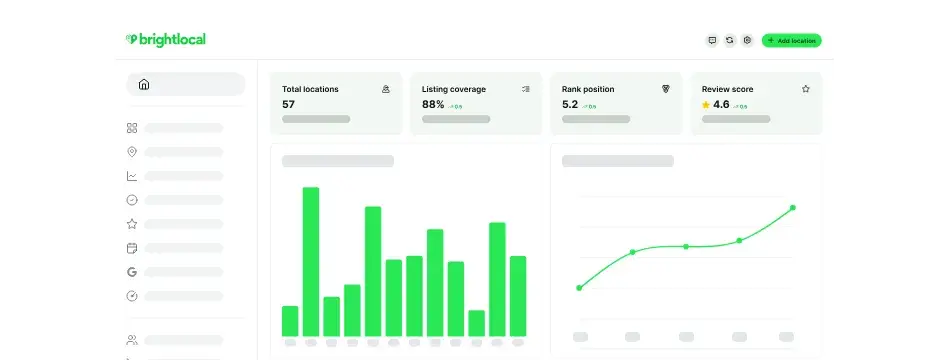
BrightLocal is a dedicated local SEO platform built specifically for multi-location brands. It includes citation management, review monitoring, and local rank tracking.
Key Features
Citation audit and management tool identifies and fixes inconsistent or missing NAP data across hundreds of local directories from a single dashboard.
Hyper-local rank tracking monitors keyword positions at city, zip code, and neighborhood level across Google, Google Maps, and Bing.
Best for: Small businesses in competitive local markets where listing accuracy and review volume directly influence rankings and customer decisions
What I like: Listing inconsistencies are one of the most common and most fixable local SEO issues and BrightLocal surfaces them fast.
Pricing: Plans start at $29/month. A free trial is available.
When to upgrade: If you’re managing listings and reviews across multiple locations, or need white-label reporting for stakeholders, BrightLocal will make workflows a lot faster.
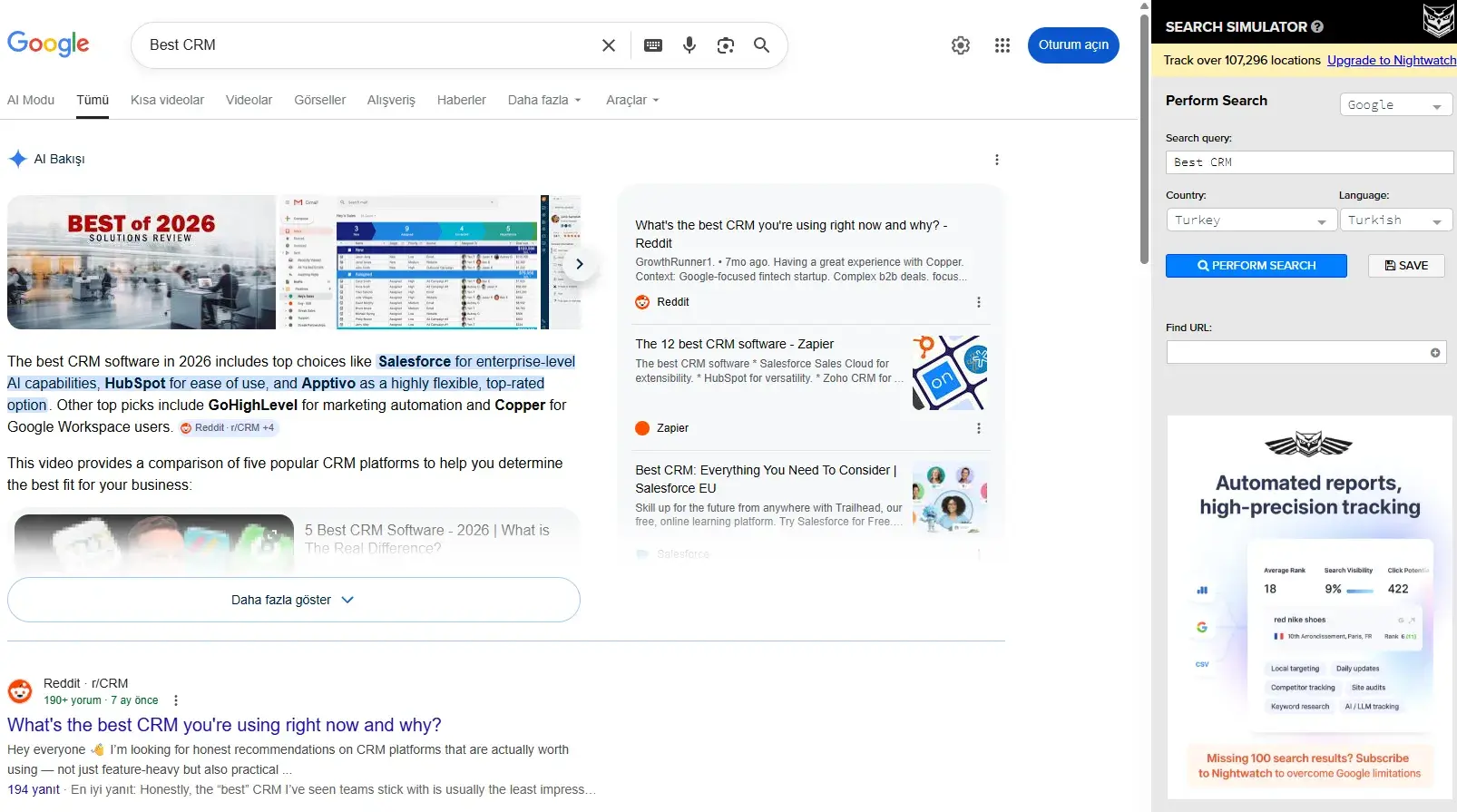
Nightwatch is a rank tracking and SEO analytics tool as well as a search simulator, so SEO specialists can review SERPs in different countries without a VPN. Its standout (paid) feature is a granular location-based rank tracker, letting small businesses monitor keyword positions at a highly specific geographic level, making it particularly well-suited to businesses where local visibility drives leads and revenue.
Key Features
Location-based rank tracking at city, zip code, and street-level granularity across Google and Bing, with daily updates and visual trend reporting.
SEO analytics dashboard consolidates rank data, organic traffic insights, and keyword performance in one clean interface with easy-to-share reporting.
Best for: Small businesses and local service providers that need precise, location-specific rank tracking without paying for a full enterprise SEO suite
What I like: I’ve used the Nightwatch Chrome extension, Search Stimulator, for years. It’s the fastest way to get an idea of what’s ranking in different countries. If I want to do a quick check of how a client is performing in the US or in European countries, I go to Nightwatch first.
Pricing: The Nightwatch Chrome extension is free, then plans with more capabilities starting at €79/month.
When to upgrade: When SEO teams need to track a large keyword set across multiple locations simultaneously, or want to integrate rank data into broader client or stakeholder reporting, the higher tiers provide the additional capacity and customization.
Tip: Every business looking to attract local customers should have a Google Business Profile.
Featured Resource: 17 Google Marketing Tools You Should Be Using.
Analytics and Reporting Tools
SEO analytics tools connect traffic and content performance to leads, pipeline, and revenue. This gives small businesses the visibility to know not just that their SEO is working, but what it’s actually worth. The tools in this section help close the loop between search performance and business outcomes, from free reporting foundations to sophisticated revenue attribution platforms.
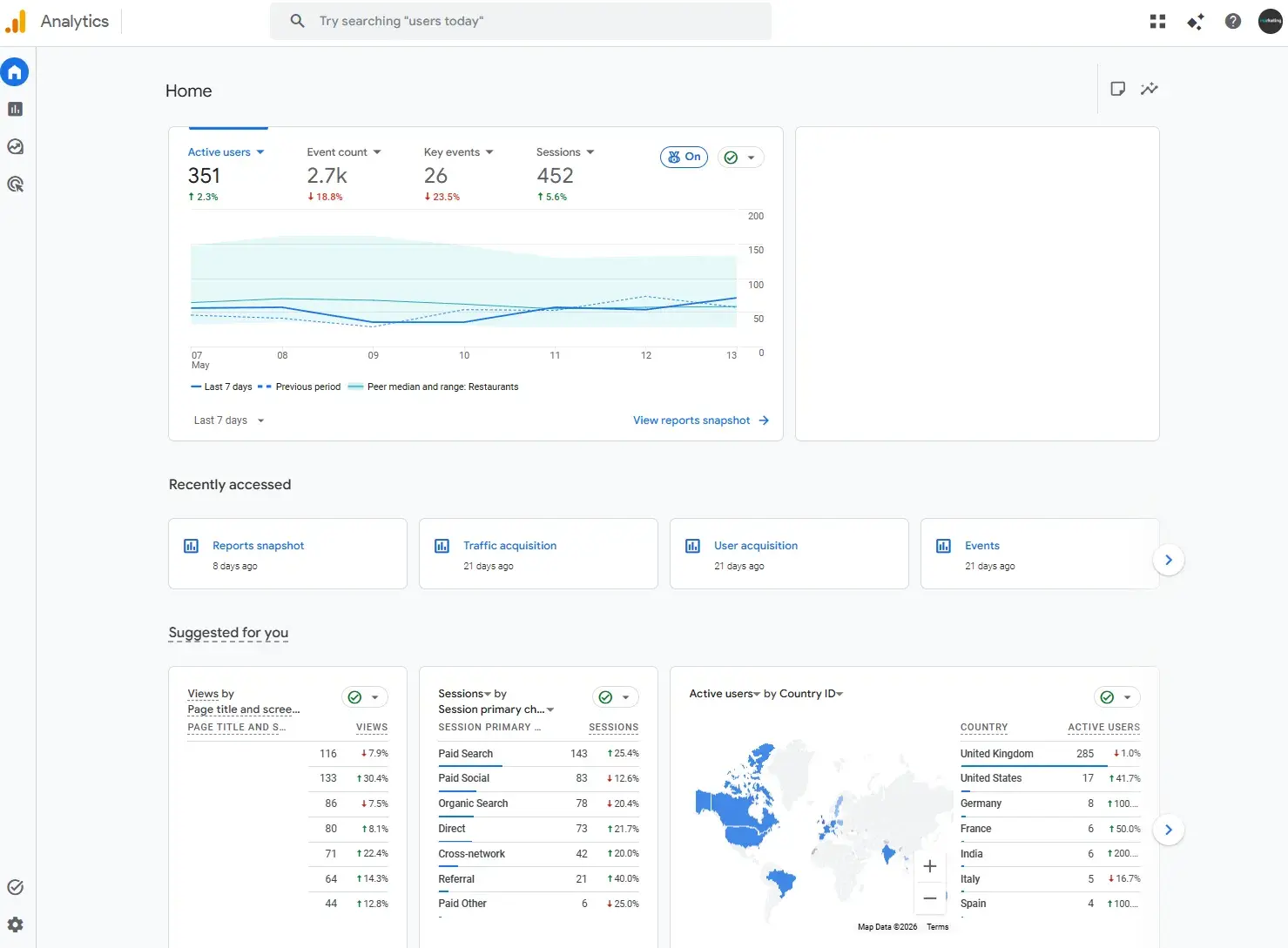
Google Analytics 4 is the standard starting point for website analytics and a foundational tool in any small business SEO stack. It tracks how visitors find, navigate, and interact with your site, providing the behavioral context that pure rank tracking tools can’t.
Key Features
Event-based tracking captures detailed user behavior across your site, including page views, scroll depth, form submissions, and conversions, with cross-device and cross-platform reporting built in.
Organic traffic reporting segments visitors by acquisition channel, letting you isolate SEO-driven traffic and measure how it converts compared to other sources.
Best for: Any small business that needs a free, reliable foundation for website analytics and wants to understand how organic search traffic behaves on their site.
What I like: Google Analytics is a must-have for all businesses, and every small business must set it up as soon as possible. It’s completely free and a trove of information about page performance. I like to look at page views, engagement, landing page reports, and events.
Pricing: Free.
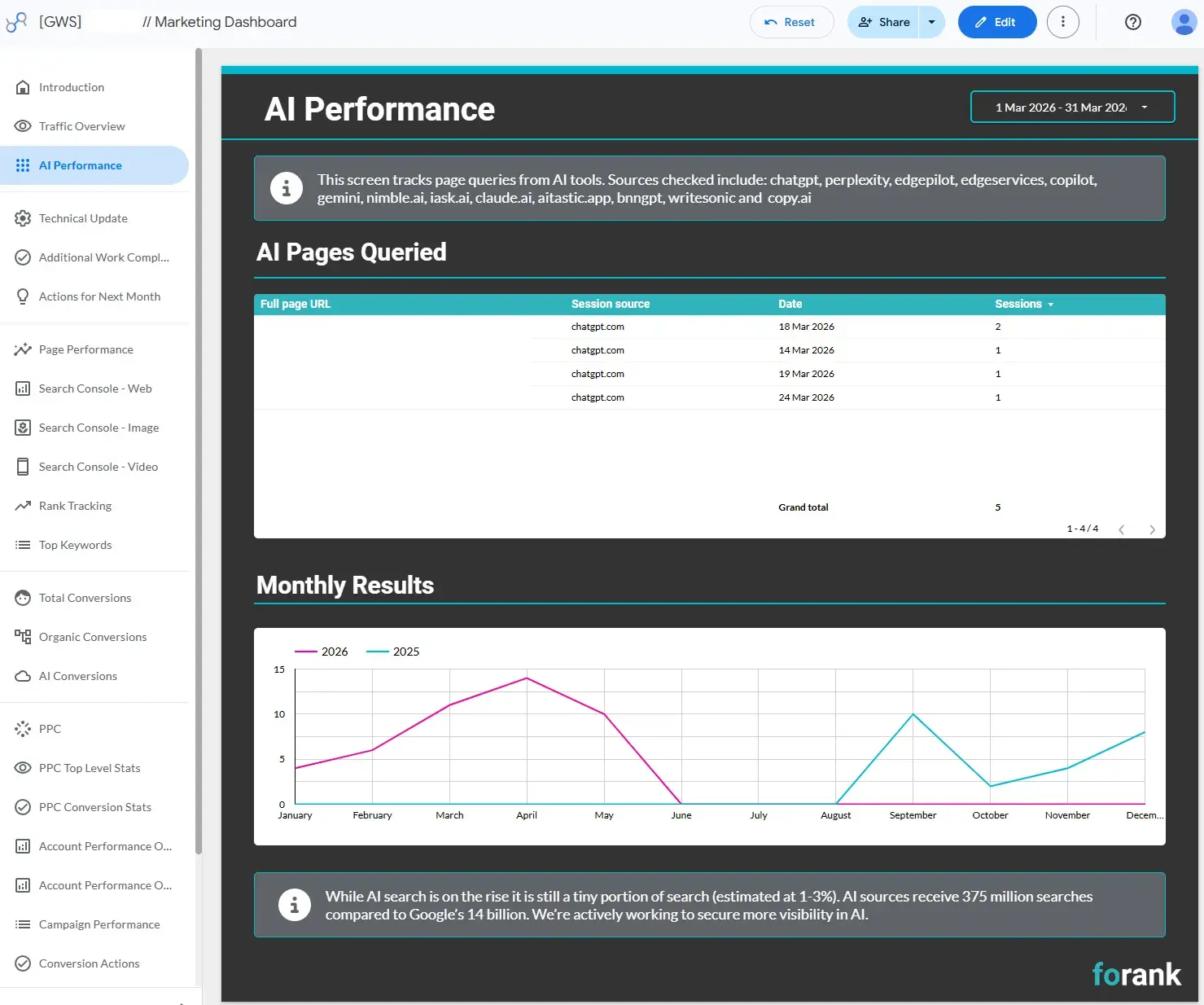
Data Studio is a free data visualization and reporting tool that pulls data from GA4, Google Search Console, and many other sources to create clean, shareable dashboards. For small businesses that need to communicate SEO performance to clients or leadership, it transforms raw data into reports that are easy to read and act on.
Key Features
Connects to GA4, Google Search Console, Google Ads, and third-party data sources via community connectors, consolidating multiple data streams into a single, customizable dashboard.
Drag-and-drop report builder lets non-technical users create professional, branded reports without writing a single line of code.
Best for: Small businesses and lean marketing teams that need to present SEO and marketing data from multiple sources into clean, shareable reports for stakeholders or clients
What I like: I love Data Studio. All of my clients have a Data Studio report. The main reason I like it — apart from the fact that it integrates with GSC, HubSpot, and Semrush — is that it updates in real time. I give my clients their Data Studio link so the data is available whenever they want to look at it, then by the second working day of every month, I update the findings in plain English so they have a report, data automated, that is sent to stakeholders on their time.
Pricing: Free.
Source
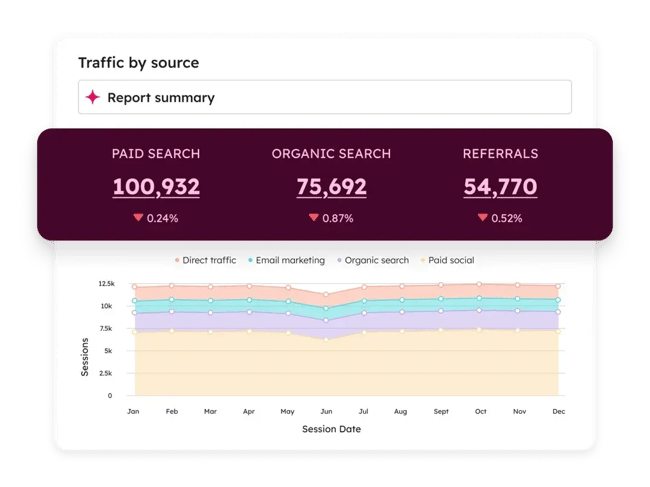
Most analytics tools show how many people visited a page. HubSpot Marketing Hub analytics connects page visits to people, showing who they were, what they did next, and whether they became a customer.
HubSpot tracks visitors from their first touchpoint through contact creation, deal progression, and closed revenue. This means businesses get a level of SEO attribution that most standalone analytics platforms simply can’t offer.
Marketing Hub’s analytics dashboard provides a clear breakdown of sessions, new contacts, and customers by source so sales and marketing teams can see how that traffic compares to paid, social, email, and direct in terms of lead quality and conversion rate.
At the content level, HubSpot users can drill into individual pages and blog posts to see which pieces are driving organic sessions, generating form submissions, and creating new contacts in the CRM. This means your content calendar is informed by data on which topics and formats are actually producing leads, so marketing can double down on what works and cut what isn’t meeting business outcomes.
The attribution reporting within Marketing Hub goes further still. You can apply multiple attribution models:
First-touch attribution. Assigns full credit for a conversion to the first interaction that introduced a user to your business.
Last-touch attribution. Gives full credit to the final interaction a user had before converting.
Linear attribution. Distributes conversion credit evenly across every touchpoint in the customer journey.
These attribution models help marketers understand how different pieces of content contribute to the customer journey at different stages. The ability to show that an informational blog post played a role in ten deals that closed last quarter is a powerful argument for SEO teams making the case for top-of-funnel content investment.
Marketing Hub’s reporting also integrates directly with HubSpot’s SEO and Content Hub tools, meaning the same dashboard that shows organic traffic and lead data can surface top SEO recommendations, track topic cluster performance, and show an AEO visibility score. This integration is where Marketing Hub’s value as an all-in-one platform becomes most tangible.
Key Features
Full-funnel attribution reporting connects organic search traffic to contact creation, deal influence, and closed revenue, applying multiple attribution models to give your team a complete picture of how SEO contributes to pipeline across the customer journey.
Integrated content and SEO performance dashboards surface page-level traffic, lead generation, and conversion data alongside CRM contact and deal records, giving small businesses a single source of truth for marketing performance without exporting data between platforms
Best for: Small businesses and growing marketing teams already using HubSpot that want to connect their SEO and content performance directly to revenue outcomes and make data-driven decisions about where to invest their marketing efforts without managing multiple disconnected analytics tools
What I like: The contact-level visibility sets Marketing Hub analytics apart. Knowing that a specific blog post generated 47 new contacts last month, and that 12 of them are now active deals in the pipeline, is the kind of insight that transforms how a small business thinks about content and SEO investment. It moves the conversation from “how’s our traffic looking?” to “which content is actually growing our business?” and this shift has never been more business-critical since the rise of AI search.
Pricing: Basic marketing analytics are available on the free plan. Starter begins at $20/month/seat. Advanced attribution reporting and custom dashboards require Marketing Hub Professional, starting at $890/month.
How to Measure Answer Engine Visibility and Adjust Your SEO Tools
Answer Engine Optimization (AEO) is the practice of optimizing content so it can be surfaced, summarized, and cited by AI-powered search experiences like Google AI Overviews, ChatGPT, or Perplexity AI. While traditional SEO focuses on rankings and clicks, AEO focuses on visibility within generated answers.
To measure answer engine visibility, teams should monitor branded mentions, AI citations, query coverage, and visibility in AI Overviews alongside traditional rankings. Tools like HubSpot AEO help marketers understand how their content performs in AI-driven search experiences while keeping SEO, CRM, and content reporting connected in one platform. As AI search evolves, businesses will need to adapt their SEO tool stacks to measure both search engine rankings and answer engine presence.
Frequently Asked Questions About SEO Tools for Small Business
Do I need an all-in-one SEO platform or separate tools?
Choosing an all-in-one SEO platform or separate tools depends on your team size, budget, and workflow complexity. All-in-one platforms can be great for small businesses and surprisingly cost effective with everything combined. However, separate specialist tools can offer deeper functionality in areas like rank tracking, backlink analysis, or AI visibility monitoring. Many growing businesses eventually adopt a hybrid approach that combines a core platform with a few specialist tools.
What is the minimum tool stack to get started this month?
Free Google-owned tools are an absolute must and the bare minimum for all businesses. At a minimum, set up Google Search Console for performance data and Google Analytics 4 for traffic insights. From there, choose a rank tracking tool like SERPWatcher (or Semrush for a more comprehensive tool). For content optimization, HubSpot is worth reviewing in full. Built on HubSpot Smart CRM, Content Hub and Marketing Hub give businesses visibility into technical SEO performance, content opportunities, and lead generation — all connected to the same contact and revenue data.
How should I integrate SEO tools with my website and CRM?
SEO tools work best when they are connected to your CMS, analytics platform, and CRM. Integrating tools with platforms like HubSpot or WordPress allows teams to track how SEO performance contributes to leads, pipeline growth, and revenue instead of focusing on rankings alone.
Build an SEO tech stack that future-proofs small, growing businesses.
The best SEO tools for small businesses help teams complete their work and analysis now by connecting keyword performance to revenue, improving technical health, optimizing content optimization, and more. However, the right tech stack will grow with any business and support long-term growth. Whether the right tool is a comprehensive all-in-one platform or a selection of specialized tools, the key is selecting the tools that make SEO measurable, actionable, and adaptable as search behavior evolves, all while growing with your business to avoid major workflow changes and unexpected costs later.
For businesses looking to simplify their workflow, HubSpot’s SEO Marketing Software and AEO tool cover both traditional and AI search visibility — with content optimization, reporting, and CRM integration connected in one platform. Plus, these tools are absolutely guaranteed to grow with any business, even if it reaches enterprise scale.